
Allow patients to see their own data
About this tutorial
In this tutorial, you will learn how to manage user access to patient resources.
Prerequisites
Once you access the Aidbox REST Console, create resources that you need to work with policies:
POST /fhir
Content-Type: text/yaml
Accept: text/yaml

resourceType: Bundle
type: transaction
entry:
- request: {method: PUT, url: Client/myapp}
  resource: {resourceType: Client, secret: verysecret, grant_types: [password]}
- request: {method: PUT, url: Patient/new-patient}
  resource: {resourceType: Patient, name: [{given: [Luke], family: Skywalker}], gender: male}
- request: {method: PUT, url: Patient/new-patient1}
  resource: {resourceType: Patient}
- request: {method: PUT, url: User/patient-user}
  resource: {resourceType: User, password: admin, data: {patient_id: new-patient}}
- request: {method: PUT, url: Practitioner/practitioner-1}
  resource: {resourceType: Practitioner}
- request: {method: PUT, url: Encounter/enc1}
  resource:
    resourceType: Encounter
    status: planned
    class: {system: 'http://terminology.hl7.org/CodeSystem/v3-ActCode', code: AMB}
    subject: {reference: Patient/new-patient}
    participant: [{individual: {reference: Practitioner/practitioner-1}}]
- request: {method: PUT, url: Encounter/enc2}
  resource:
    resourceType: Encounter
    status: planned
    class: {system: 'http://terminology.hl7.org/CodeSystem/v3-ActCode', code: AMB}
    subject: {reference: Patient/new-patient1}
- request: {method: PUT, url: Observation/observation-1}
  resource:
    resourceType: Observation
    status: registered
    code: {coding: [{system: 'http://loinc.org', code: 11557-6}]}
    subject: {reference: Patient/new-patient}
    performer: [{reference: Practitioner/practitioner-1}]
- request: {method: PUT, url: Observation/observation-2}
  resource:
    resourceType: Observation
    status: registered
    code: {coding: [{system: 'http://loinc.org', code: 11557-6}]}
    subject: {reference: Patient/new-patient1}
    performer: [{reference: Practitioner/practitioner-1}]
Structure of created resources
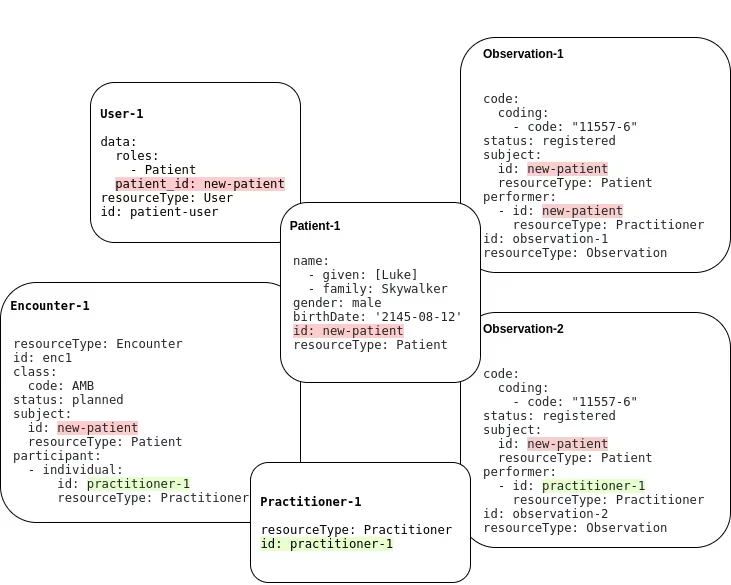
In the previous step, we have created a client that will authenticate users and a user with the set of related resources shown on the picture below. Overlapping outlines indicates the relation between enclosed resources.
User Login
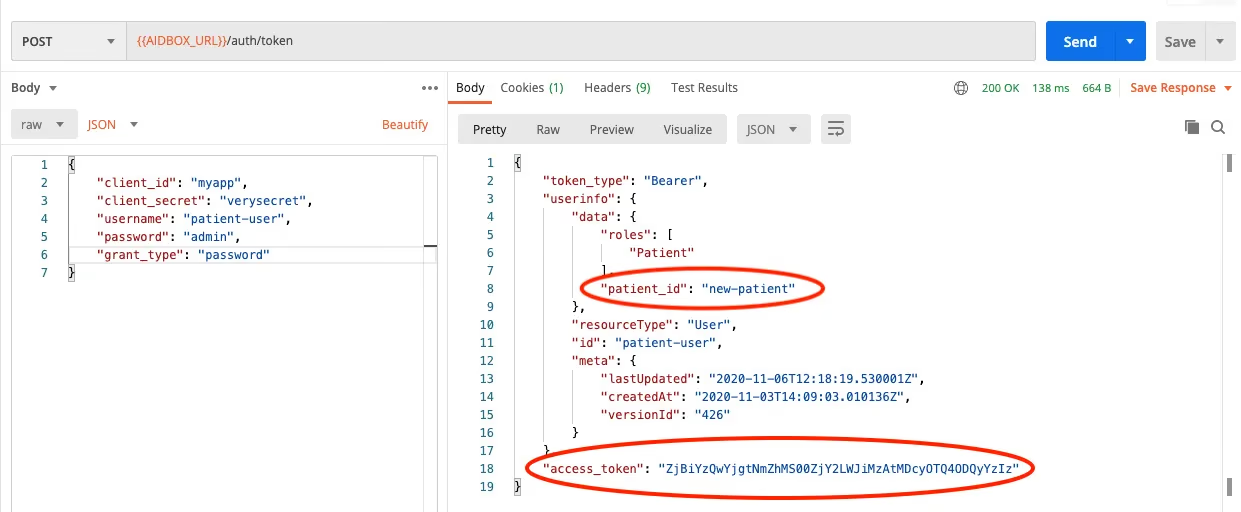
Now you can use Postman to log in as a user. In this example, we log in as User-1.
POST /auth/token

{
  "client_id": "myapp",
  "client_secret": "verysecret",
  "username": "patient-user",
  "password": "admin",
  "grant_type": "password"
}
{
  "token_type": "Bearer",
  "userinfo": {
    "data": {
      "patient_id": "new-patient"
    },
    "resourceType": "User",
    "id": "patient-user"
  },
  "access_token": "MjYzOTkyZDEtODg4ZC00NTBlLTgxNDEtNjIzM2Y4NWQ1M2Vk"
}
Notice the patient_id field of userinfo . This is the id of the Patient resource associated with our user. It will be used further in Access Policies to decide if access should be granted or not. In general, you need to specify data.patient_id: some_patient_id in your User resource to establish a relation to a Patient resource.
The access_token field of the response will be needed to perform requests on behalf of our User. See here how to perform user request with a token.
At this point there are no access policies that allow the user to access any resources. So all attempts to make requests for Resources will be denied.
Patient Resource access
Let's add our first policy that will grant us access to the Patient resource associated with our user.
PUT /fhir/AccessPolicy/patient-access
Content-Type: text/yaml
Accept: text/yaml

resourceType: AccessPolicy
engine: matcho
matcho:
  uri: '#/fhir/Patient/.*'
  params:
    resource/id: .user.data.patient_id
  request-method: get
Here we specified that Access Policy would grant GET access to a URI that matches #/fhir/Patient/.* regex if the request parameter named resource/id matches data.patient_id value of the user that makes the request.
So now we can read our patient. The part of the URL after /fhir/Patient/, namely new-patient, is parsed by Access Policy engine as the resource/id parameter of the request:
GET /fhir/Patient/new-patient
{
  "resourceType": "Patient",
  "id": "new-patient",
  "name": [
    {
      "given": ["Luke"],
      "family": "Skywalker"
    }
  ],
  "gender": "male"
}
You can check that access to any other existing Patient resource, for instance, that one with id new-patient1, will be denied.
Encounter access
Now let's give our user the ability to retrieve all encounters where they are referred to as a subject:
PUT /fhir/AccessPolicy/search-patient-encounter
Content-Type: text/yaml
Accept: text/yaml

resourceType: AccessPolicy
engine: matcho
matcho:
  uri: /fhir/Encounter
  params:
    patient: .user.data.patient_id
  request-method: get
And this policy is a bit tricky. The allowed URI is /fhir/Encounter and it doesn't contain any additional parts that could be identified as request parameters as in the previous case. So, in order to provide the required request parameter patient to the Access Policy matching engine, we have to specify it as the query parameter of our request. And after the Access Policy engine allows such a request, the Search Engine comes into play. It filters out encounters that do not match the condition of patient = our-patient-id. To know more about how the Aidbox Search works, see the Search section. To know more about the available search parameters, refer to the Search Parameters section of the FHIR documentation for the resource of interest.
Finally, we can make a request for the list of patient encounters.
GET /fhir/Encounter?patient=new-patient
{
  "resourceType": "Bundle",
  "type": "searchset",
  "total": 1,
  "entry": [
    {
      "resource": {
        "resourceType": "Encounter",
        "id": "enc1",
        "status": "planned",
        "class": {
          "system": "http://terminology.hl7.org/CodeSystem/v3-ActCode",
          "code": "AMB"
        },
        "subject": {
          "reference": "Patient/new-patient"
        },
        "participant": [
          {
            "individual": {
              "reference": "Practitioner/practitioner-1"
            }
          }
        ]
      }
    }
  ]
}
Observation access
Read access
Granting access to observations is similar to the previous case. We just add another policy that looks just like the previous one, but matches against another URI. It is so similar that we should stop there and think a little about what happens if we want to grant read access to more resources — we will end up with a bunch of almost indistinguishable policies. A better approach, in this case, is to use the patient compartment.
The patient CompartmentDefinition (http://hl7.org/fhir/CompartmentDefinition/patient) comes with the FHIR core package, so we can access patient-related resources with such requests: GET /fhir/Patient/{patient-id}/{resource}. To know in detail about how compartments work, see the Compartments tutorial.
And that's it! We don't even need to add more policies, since we already have the policy that allows the user to access URIs that match /fhir/Patient/.* regex.
GET /fhir/Patient/new-patient/Observation
{
  "resourceType": "Bundle",
  "type": "searchset",
  "total": 1,
  "entry": [
    {
      "resource": {
        "resourceType": "Observation",
        "id": "observation-1",
        "status": "registered",
        "code": {
          "coding": [
            {
              "system": "http://loinc.org",
              "code": "11557-6"
            }
          ]
        },
        "subject": {
          "reference": "Patient/new-patient"
        },
        "performer": [
          {
            "reference": "Practitioner/practitioner-1"
          }
        ]
      }
    }
  ]
}
The patient compartment defines which resources belong to a patient. See FHIR documentation to know what resources are included in a patient compartment. And we can get rid of the Access Policy that was previously created for encounters: GET /fhir/Patient/new-patient/Encounter works with the patient-access policy.
Write access
The user should be able to create their own observation, e.g., to report blood sugar level. The following policy manages this case:
PUT /fhir/AccessPolicy/create-patient-observation
Content-Type: text/yaml
Accept: text/yaml

resourceType: AccessPolicy
engine: complex
and:
- engine: matcho
  matcho:
    uri: /fhir/Observation
    request-method: post
- engine: sql
  sql:
    query: |
      SELECT {{body.subject.reference}}::text = 'Patient/' || {{user.data.patient_id}}::text
        AND {{body.performer}}::jsonb @> jsonb_build_array(jsonb_build_object('reference', 'Patient/' || {{user.data.patient_id}}::text))
With this policy, we can only create observations where the subject and performer must be the user's patient. The request body uses FHIR references (Patient/<id>), so the policy compares them with the patient_id of the user in SQL.
POST /fhir/Observation

{
  "resourceType": "Observation",
  "id": "observation-3",
  "code": {
    "coding": [
      {
        "system": "http://loinc.org",
        "code": "11557-6"
      }
    ]
  },
  "status": "registered",
  "subject": {
    "reference": "Patient/new-patient"
  },
  "performer": [
    {
      "reference": "Patient/new-patient"
    }
  ]
}
Now it's time to make an important note. In general, it is not possible to use some kind of compartment approach to grant write access to many resources at once, as we did previously for read access. That's because resources may require sophisticated logic to define which part of a resource could have write access and which not. Such logic may even lie beyond the abilities of the Access Control mechanism and in this case custom API is the only resort. But in a quite simple scenario like the creation of observation, Access Policies are helpful.
Let's create a new policy that allows our user to update their observations through the PATCH method. Matcho engine is no longer enough to make a rule for this kind of request since it only relies on the request and the user parameters. Now we need to peek into the requested resource to understand if it is related to our user and could be patched. The policy is linked to the FhirPatch operation, so it applies only to PATCH /fhir/Observation/<id> requests.
PUT /fhir/AccessPolicy/patch-observation
Content-Type: text/yaml
Accept: text/yaml

resourceType: AccessPolicy
link:
- reference: Operation/FhirPatch
engine: sql
sql:
  query: |
    SELECT true FROM observation
    WHERE id = {{params.resource/id}}
      AND resource#>>'{subject,id}' = {{user.data.patient_id}}
      AND resource->'performer' @> jsonb_build_array(jsonb_build_object('resourceType', 'Patient', 'id', {{user.data.patient_id}}::text))
      AND coalesce({{body.subject.reference}}::text, 'Patient/' || {{user.data.patient_id}}::text) = 'Patient/' || {{user.data.patient_id}}::text
The query reads the stored observation, so it uses the Aidbox storage format for references (subject.id, performer[].id). The last condition rejects patches that move the observation to another patient.
Now we can patch our observation:
PATCH /fhir/Observation/observation-3

{
  "status": "final"
}
Patching observation-1 (its performer is a practitioner) or observation-2 (it belongs to another patient) is denied.
Access to the next of kin records
Access policies depend a lot on how we model our resources. FHIR doesn't provide convenient facilities to make relations between patients. The easiest way to add such relations is to enhance a User resource with the list of related patients. Let's define that new-patient1 is related to User-1. Make this request as an administrator:
PATCH /fhir/User/patient-user
Content-Type: text/yaml
Accept: text/yaml

data:
  related_patients:
    - new-patient1
To grant User-1 access to related patients, we should simply update patient-access policy.
PUT /fhir/AccessPolicy/patient-access
Content-Type: text/yaml
Accept: text/yaml

resourceType: AccessPolicy
engine: matcho
matcho:
  uri: '#/fhir/Patient/.*'
  user:
    data:
      $one-of:
        - related_patients:
            $contains: .params.resource/id
        - patient_id: .params.resource/id
  request-method: get
Now the user can read both GET /fhir/Patient/new-patient and GET /fhir/Patient/new-patient1.