
AidboxTopicSubscription AWS SNS tutorial
This functionality is available starting from Aidbox version 2602.
Aidbox version compatibility
| Aidbox | Connector JAR | Profile URL |
|---|---|---|
| ≥ 2604 | topic-destination-sns-2604.0.jar | http://health-samurai.io/fhir/core/StructureDefinition/aidboxtopicdestination-awssnsBestEffortProfilehttp://health-samurai.io/fhir/core/StructureDefinition/aidboxtopicdestination-awssnsAtLeastOnceProfile |
| < 2604 | topic-destination-sns-2602.1.jar | http://aidbox.app/StructureDefinition/aidboxtopicdestination-aws-sns-best-efforthttp://aidbox.app/StructureDefinition/aidboxtopicdestination-aws-sns-at-least-once |
Examples below use the ≥ 2604 form. On older Aidbox, swap both the JAR and the meta.profile URL. Redeploy the JAR when crossing the 2604 boundary — older JARs register profiles via a legacy path the new validator no longer honors.
Objectives
- Learn how to integrate AidboxTopicSubscriptions with AWS SNS
Before you begin
- Make sure your Aidbox version is 2602 or newer
- Setup the local Aidbox instance using getting started guide
What is AWS SNS?
AWS SNS is a fully managed pub/sub messaging service that enables you to decouple microservices, distributed systems, and event-driven serverless applications. SNS delivers messages to subscribers using a push-based model, supporting protocols such as HTTP/S, email, SMS, SQS, Lambda, and more.
For detailed information, see the official SNS documentation.
Key Concepts
Topic is a communication channel for publishing messages. Publishers send messages to a topic, and SNS delivers them to all subscribers.
Subscription connects a topic to an endpoint (SQS queue, Lambda, HTTP/S, email, SMS). Each subscription receives a copy of every message published to the topic.
FIFO Topics provide strict message ordering and exactly-once delivery. FIFO topic names end with .fifo and require a messageGroupId for each message.
Best Effort vs At-Least-Once Delivery
In Aidbox, two AidboxTopicDestination profiles are supported:
http://health-samurai.io/fhir/core/StructureDefinition/aidboxtopicdestination-awssnsBestEffortProfile— Events are sent immediately. If SNS returns an error, the event is lost. Low latency, suitable for non-critical notifications.http://health-samurai.io/fhir/core/StructureDefinition/aidboxtopicdestination-awssnsAtLeastOnceProfile— Events are persisted to database before sending. If SNS is unavailable, events remain in queue and are retried automatically. Supports batching up to 10 events. Guaranteed delivery for critical integrations.
Setting up locally
Follow the steps to try AWS SNS AidboxTopicSubscription with LocalStack — a local AWS emulator for development and testing.
1. Create directory structure
mkdir sns-tutorial && cd sns-tutorial
2. Configure docker-compose.yaml
Download the getting started docker-compose.yaml and add LocalStack service for local testing:
services:
  localstack:
    image: localstack/localstack:latest
    ports:
      - "4566:4566"
    environment:
      - SERVICES=sns,sqs
      - DEBUG=1

  aidbox:
    # ... existing aidbox configuration ...
    volumes:
      - ./topic-destination-sns-2602.1.jar:/topic-destination-sns.jar
    environment:
      BOX_MODULE_LOAD: io.healthsamurai.topic-destination.sns.core
      BOX_MODULE_JAR: "/topic-destination-sns.jar"
      # ... other envs ...
3. Download the SNS module
Download .jar SNS module file from our bucket and place it next to docker-compose.yaml.
curl -O https://storage.googleapis.com/aidbox-modules/topic-destination-aws-sns/topic-destination-sns-2602.1.jar
4. Start services
docker compose up -d
5. Verify installation
In AidboxUI, go to FHIR Packages -> io.health-samurai.core.r4#0.0.0-snapshot and make sure that SNS profiles are present:
aidboxtopicdestination-aws-sns-best-effortaidboxtopicdestination-aws-sns-at-least-once
6. Create SNS topic and SQS subscriber in LocalStack
Since SNS is a push-based service, we need a subscriber to verify messages are delivered. Create an SNS topic, an SQS queue, and subscribe the queue to the topic:
aws --endpoint-url=http://localhost:4566 sns create-topic \
  --name patient-events \
  --region us-east-1
aws --endpoint-url=http://localhost:4566 sqs create-queue \
  --queue-name patient-events-queue \
  --region us-east-1
aws --endpoint-url=http://localhost:4566 sns subscribe \
  --topic-arn arn:aws:sns:us-east-1:000000000000:patient-events \
  --protocol sqs \
  --notification-endpoint arn:aws:sqs:us-east-1:000000000000:patient-events-queue \
  --region us-east-1
Basic Usage (Best Effort)
1. Create a subscription topic
POST /fhir/AidboxSubscriptionTopic
content-type: application/json
accept: application/json

{
  "resourceType": "AidboxSubscriptionTopic",
  "url": "patient-topic",
  "status": "active",
  "trigger": [
    {
      "resource": "Patient",
      "fhirPathCriteria": "name.exists()"
    }
  ]
}
2. Create AidboxTopicDestination
POST /fhir/AidboxTopicDestination
content-type: application/json
accept: application/json

{
  "id": "sns-destination",
  "resourceType": "AidboxTopicDestination",
  "meta": {
    "profile": [
      "http://health-samurai.io/fhir/core/StructureDefinition/aidboxtopicdestination-awssnsBestEffortProfile"
    ]
  },
  "kind": "aws-sns-best-effort",
  "topic": "patient-topic",
  "parameter": [
    {
      "name": "topicArn",
      "valueString": "arn:aws:sns:us-east-1:000000000000:patient-events"
    },
    {
      "name": "region",
      "valueString": "us-east-1"
    },
    {
      "name": "accessKeyId",
      "valueString": "test"
    },
    {
      "name": "secretAccessKey",
      "valueString": "test"
    },
    {
      "name": "endpointOverride",
      "valueString": "http://localstack:4566"
    }
  ]
}
3. Create a Patient
POST /fhir/Patient
content-type: application/json

{
  "name": [{"family": "Smith", "given": ["John"]}]
}
4. Verify event delivery
Check the topic destination status:
GET /fhir/AidboxTopicDestination/sns-destination/$status
View events in LocalStack
Read messages from the SQS queue:
aws --endpoint-url=http://localhost:4566 sqs receive-message \
  --queue-url http://sqs.us-east-1.localhost.localstack.cloud:4566/000000000000/patient-events-queue \
  --region us-east-1
The response contains an SNS notification envelope in the Body field:
{
    "Messages": [
        {
            "MessageId": "e6e85c6c-9d6f-411e-90f5-76c770a3efb6",
            "ReceiptHandle": "YzExNjA4Y...",
            "MD5OfBody": "823410b8aba2ce106f19e73407788854",
            "Body": "<json>"
        }
    ]
}
Extract the FHIR notification Bundle from the SNS envelope using jq:
aws --endpoint-url=http://localhost:4566 sqs receive-message \
  --queue-url http://sqs.us-east-1.localhost.localstack.cloud:4566/000000000000/patient-events-queue \
  --region us-east-1 \
  | jq -r '.Messages[0].Body | fromjson | .Message | fromjson'
At-Least-Once Delivery
For guaranteed delivery with batch processing, use the at-least-once profile:
POST /fhir/AidboxTopicDestination
content-type: application/json
accept: application/json

{
  "id": "sns-reliable",
  "resourceType": "AidboxTopicDestination",
  "meta": {
    "profile": [
      "http://health-samurai.io/fhir/core/StructureDefinition/aidboxtopicdestination-awssnsAtLeastOnceProfile"
    ]
  },
  "kind": "aws-sns-at-least-once",
  "topic": "patient-topic",
  "parameter": [
    {
      "name": "topicArn",
      "valueString": "arn:aws:sns:us-east-1:000000000000:patient-events"
    },
    {
      "name": "region",
      "valueString": "us-east-1"
    },
    {
      "name": "accessKeyId",
      "valueString": "test"
    },
    {
      "name": "secretAccessKey",
      "valueString": "test"
    },
    {
      "name": "endpointOverride",
      "valueString": "http://localstack:4566"
    },
    {
      "name": "batchSize",
      "valueInteger": 10
    }
  ]
}
The batchSize parameter (1-10) controls how many events are sent in a single PublishBatch API call. SNS allows maximum 10 entries per request.
Configuration Reference
Available Parameters
| Parameter | Type | Required | Description |
|---|---|---|---|
topicArn | valueString | Yes | SNS topic ARN (arn:aws:sns:us-east-1:123456789012:my-topic) |
region | valueString | Yes | AWS region (us-east-1, eu-west-1, etc.) |
accessKeyId | valueString | No | AWS Access Key ID (uses default credential chain if not provided) |
secretAccessKey | valueString | No | AWS Secret Access Key |
endpointOverride | valueString | No | Override endpoint URL (for LocalStack: http://localstack:4566) |
messageGroupId | valueString | No | Message group ID for FIFO SNS topics (required for .fifo topics) |
batchSize | valueInteger | No | Events per batch, 1-10 (at-least-once only, default: 1) |
Message Format
Messages published to SNS have this structure:
{
  "topic": "patient-topic",
  "value": {
    "resourceType": "Bundle",
    "type": "history",
    "timestamp": "2026-02-18T07:48:19Z",
    "entry": [
      {
        "resource": {
          "resourceType": "AidboxSubscriptionStatus",
          "status": "active",
          "type": "event-notification",
          "notificationEvent": [
            {
              "eventNumber": 1,
              "focus": { "reference": "Patient/7d9388ae-9f0e-437a-a055-cc3129f7f5b9" }
            }
          ],
          "topic": "patient-topic",
          "topic-destination": {
            "reference": "AidboxTopicDestination/sns-destination"
          }
        }
      },
      {
        "request": { "method": "POST", "url": "/fhir/Patient" },
        "fullUrl": "http://localhost:8080/fhir/Patient/7d9388ae-9f0e-437a-a055-cc3129f7f5b9",
        "resource": {
          "resourceType": "Patient",
          "id": "7d9388ae-9f0e-437a-a055-cc3129f7f5b9",
          "name": [{ "given": ["John"], "family": "Smith" }]
        }
      }
    ]
  }
}
AWS Authentication
Option 1: Access Keys (for development)
Provide accessKeyId and secretAccessKey parameters directly in the AidboxTopicDestination.
Option 2: IAM Role (recommended for production)
When running on AWS (EC2, ECS, EKS), omit accessKeyId and secretAccessKey. The module will use the default AWS credential chain:
- Environment variables (
AWS_ACCESS_KEY_ID,AWS_SECRET_ACCESS_KEY) - Web Identity Token (for EKS)
- EC2/ECS Instance Profile
Required IAM permissions:
{
  "Version": "2012-10-17",
  "Statement": [
    {
      "Effect": "Allow",
      "Action": "sns:Publish",
      "Resource": "arn:aws:sns:*:*:your-topic-name"
    }
  ]
}
Monitoring
Status Endpoint
GET /fhir/AidboxTopicDestination/{id}/$status
Response Parameters
| Parameter | Description |
|---|---|
messagesDelivered | Total successfully delivered events |
messagesDeliveryAttempts | Failed delivery attempts |
messagesInProcess | Events currently being sent |
messagesQueued | Events waiting in queue (at-least-once only) |
startTimestamp | Destination start time |
status | Always active |
lastErrorDetail | Recent error information |
Prometheus Metrics
GET /metrics
Metrics include:
aidbox_topic_destination_messages_deliveredaidbox_topic_destination_messages_queuedaidbox_topic_destination_messages_in_process
Set up with AWS
Prerequisites
- AWS account with SNS access
- AWS CLI configured:
aws configure - IAM user/role with
sns:Publishpermission
Step 1: Create SNS Topic
aws sns create-topic --name aidbox-events --region us-east-1
Step 2: Create SQS Queue for Testing
Create a queue to receive events (for verification):
aws sqs create-queue --queue-name aidbox-test-queue --region us-east-1
Step 3: Subscribe SQS to SNS
SNS_ARN=arn:aws:sns:us-east-1:YOUR_ACCOUNT_ID:aidbox-events

SQS_ARN=$(aws sqs get-queue-attributes \
  --queue-url https://sqs.us-east-1.amazonaws.com/YOUR_ACCOUNT_ID/aidbox-test-queue \
  --attribute-names QueueArn \
  --query 'Attributes.QueueArn' \
  --output text \
  --region us-east-1)
aws sns subscribe \
  --topic-arn $SNS_ARN \
  --protocol sqs \
  --notification-endpoint $SQS_ARN \
  --region us-east-1
Step 4: Configure SQS Policy
Allow SNS to send messages to SQS:
aws sqs set-queue-attributes \
  --queue-url https://sqs.us-east-1.amazonaws.com/YOUR_ACCOUNT_ID/aidbox-test-queue \
  --attributes '{
    "Policy": "{\"Version\":\"2012-10-17\",\"Statement\":[{\"Effect\":\"Allow\",\"Principal\":{\"Service\":\"sns.amazonaws.com\"},\"Action\":\"sqs:SendMessage\",\"Resource\":\"arn:aws:sqs:us-east-1:YOUR_ACCOUNT_ID:aidbox-test-queue\"}]}"
  }' \
  --region us-east-1
Step 5: Create AidboxTopicDestination
When running on AWS infrastructure (EC2, ECS, EKS), use IAM roles instead of access keys. See AWS Authentication for details.
POST /fhir/AidboxTopicDestination
content-type: application/json

{
  "id": "sns-aws",
  "resourceType": "AidboxTopicDestination",
  "meta": {
    "profile": [
      "http://health-samurai.io/fhir/core/StructureDefinition/aidboxtopicdestination-awssnsAtLeastOnceProfile"
    ]
  },
  "kind": "aws-sns-at-least-once",
  "topic": "patient-topic",
  "parameter": [
    {"name": "topicArn", "valueString": "arn:aws:sns:us-east-1:YOUR_ACCOUNT_ID:aidbox-events"},
    {"name": "region", "valueString": "us-east-1"}
  ]
}
Step 6: Test and Verify
- Create a Patient in Aidbox (see Basic Usage above)
- Open the Amazon SQS console, select your queue, and click Send and receive messages
- In the Receive messages section, click Poll for messages
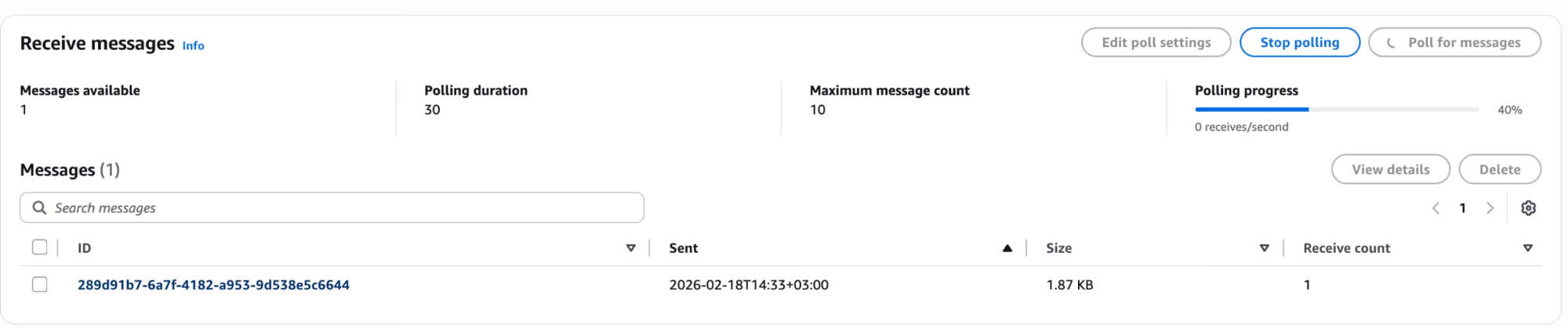
Polling for messages in the SQS queue subscribed to the SNS topic
- Click on a message to view its contents — the Body contains the SNS notification envelope with the FHIR Bundle:
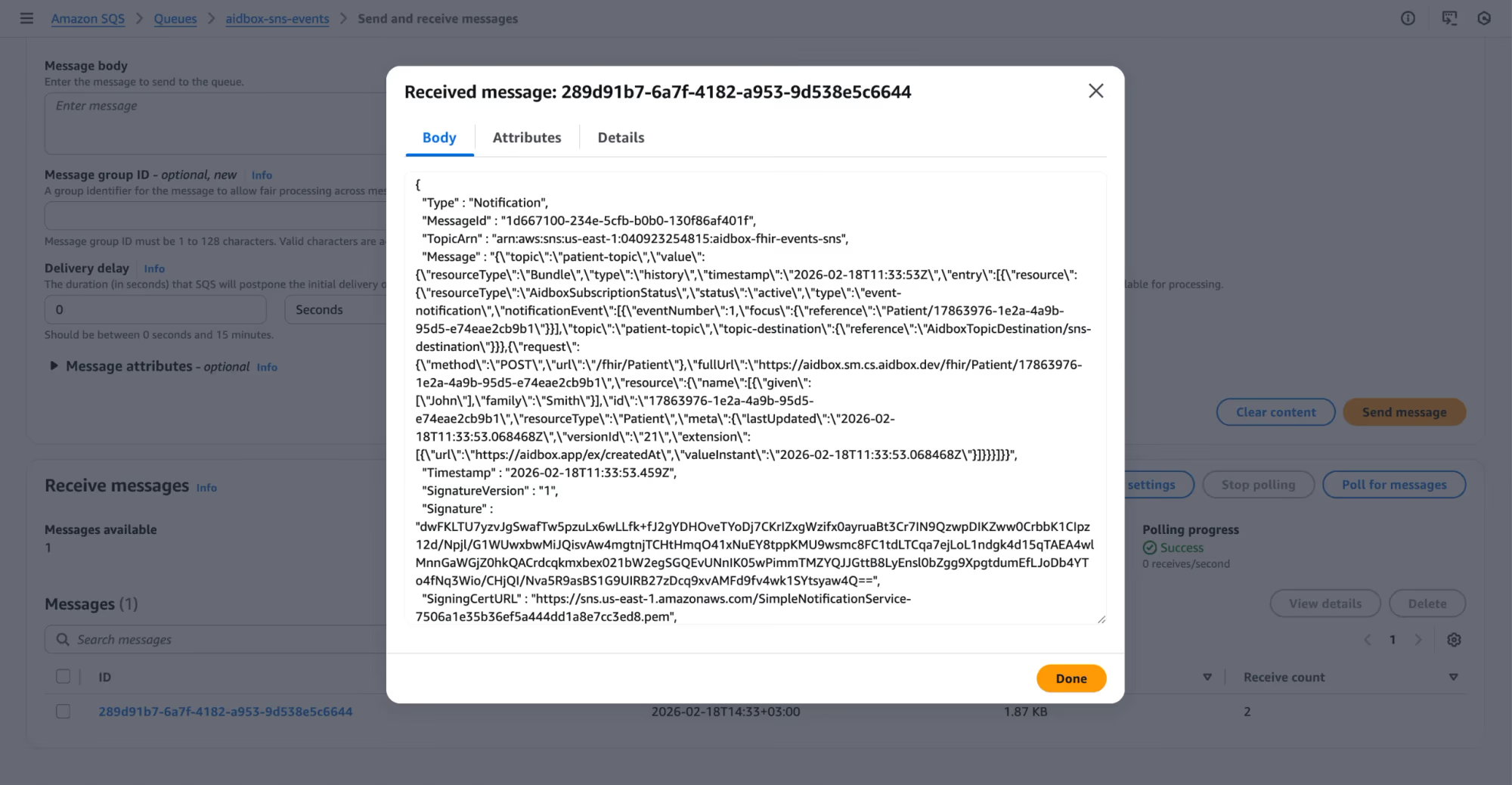
SNS notification containing the FHIR event Bundle with Patient resource
You can also verify via CLI:
aws sqs receive-message \
  --queue-url https://sqs.us-east-1.amazonaws.com/YOUR_ACCOUNT_ID/aidbox-test-queue \
  --region us-east-1