---
description: >-
This guide shows how to set-up access control to make patients be able to see
their own data
---
# Allow patients to see their own data
## About this tutorial
In this tutorial, you will learn how to manage user access to patient resources.
## Prerequisites
Once you access the Aidbox REST Console, load resources that you need to work with policies:
```yaml
POST /$import
id: patient_import
inputFormat: application/fhir+ndjson
contentEncoding: gzip
mode: bulk
inputs:
- resourceType: Client
url: https://storage.googleapis.com/aidbox-public/demo/client.ndjson.gz
- resourceType: User
url: https://storage.googleapis.com/aidbox-public/demo/user.ndjson.gz
- resourceType: Patient
url: https://storage.googleapis.com/aidbox-public/demo/patient.ndjson.gz
- resourceType: Encounter
url: https://storage.googleapis.com/aidbox-public/demo/encounter.ndjson.gz
- resourceType: Observation
url: https://storage.googleapis.com/aidbox-public/demo/observation.ndjson.gz
- resourceType: Practitioner
url: https://storage.googleapis.com/aidbox-public/demo/practitioner.ndjson.gz
```
### Structure of imported resources
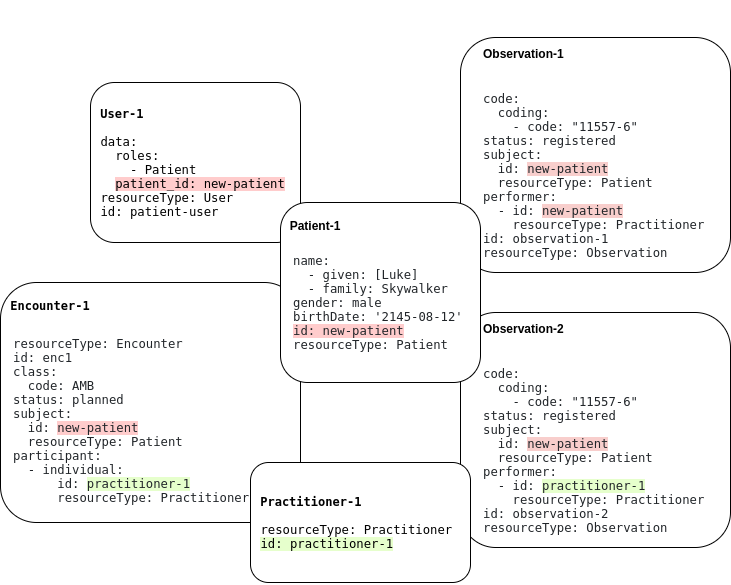
In the previous step, we have imported a client that will authenticate users and two users with corresponding sets of related resources shown on the picture below. Overlapping outlines indicates the relation between enclosed resources. A similar diagram applies to User-2.
## User Login
Now you can use Postman to log in as a user. In this example, we log in as User-1.
{% tabs %}
{% tab title="Request" %}
```javascript
POST /auth/token
{
"client_id": "myapp"
"client_secret": "verysecret"
"username": "patient-user"
"password": "admin"
"grant_type": "password"
}
```
{% endtab %}
{% tab title="Response" %}
```javascript
{
"token_type": "Bearer",
"userinfo": {
"data": {
"roles": ["Patient"],
"patient_id": "new-patient"
},
"resourceType": "User",
"id": "patient-user",
"meta": {
"lastUpdated": "2020-11-06T12:18:19.530001Z",
"createdAt": "2020-11-03T14:09:03.010136Z",
"versionId": "426"
}
},
"access_token": "MjYzOTkyZDEtODg4ZC00NTBlLTgxNDEtNjIzM2Y4NWQ1M2Vk"
}
```
{% endtab %}
{% endtabs %}
Notice the `patient_id` field of `userinfo` . This is the id of the Patient resource associated with our user. It will be used further in Access Policies to decide if access should be granted or not. In general, you need to specify `data.patient_id: some_patient_id` in your User resource to establish a relation to a Patient resource.
The `access-token` field of `user-info` will be needed to perform requests on behalf of our User. See [here](resource-owner-grant.md) how to perform user request with a token.
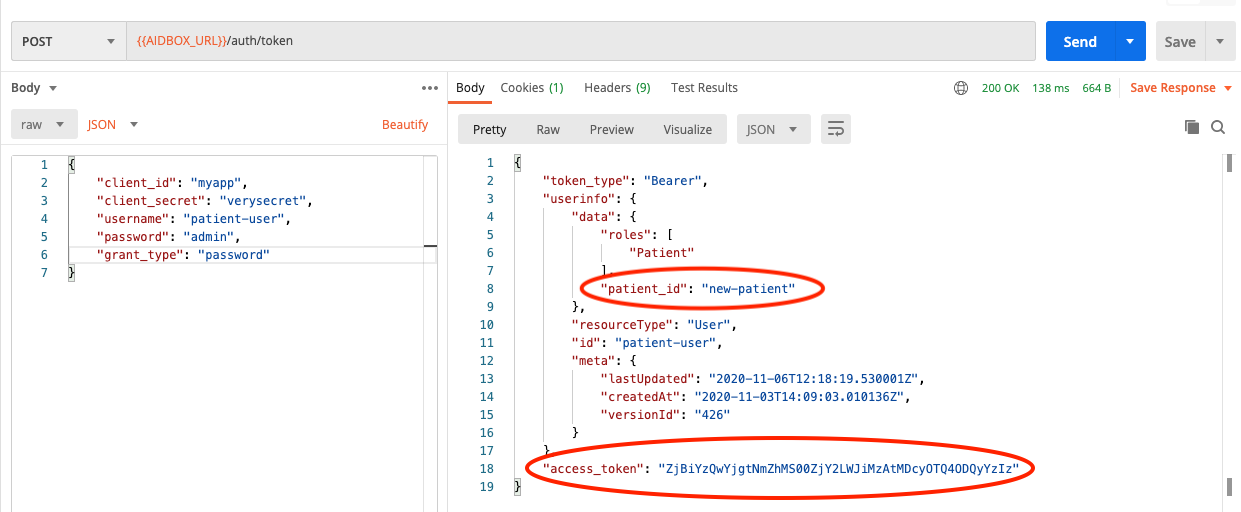
At this point there are no access policies that allow the user to access any resources. So all attempts to make requests for Resources will be denied.
## Patient Resource access
Let's add our first policy that will grant us access to the Patient resource associated with our user.
{% tabs %}
{% tab title="Request" %}
```yaml
POST /AccessPolicy
id: patient-access
engine: matcho
matcho:
uri: '#/Patient/.*'
params:
resource/id: .user.data.patient_id
request-method: get
```
{% endtab %}
{% tab title="Response" %}
```javascript
engine: matcho
matcho:
uri: '#/Patient/.*'
params:
resource/id: .user.data.patient_id
request-method: get
id: patient-access
resourceType: AccessPolicy
meta:
lastUpdated: '2020-11-10T15:00:59.497835Z'
createdAt: '2020-11-10T15:00:59.497835Z'
versionId: '110'
```
{% endtab %}
{% endtabs %}
Here we specified that Access Policy would grant `GET` access to a URI that matches `#/Patient/.*` regex if the request parameter named `resource/id` matches `data.patient` value of the user that makes the request.
So now we can read our patient. The part of the URL after `/Patient/`, namely `new-patient`, is parsed by Access Policy engine as the `resource/id` parameter of the request:
{% tabs %}
{% tab title="Request" %}
```yaml
GET /Patient/new-patient
```
{% endtab %}
{% tab title="Response" %}
```yaml
{
"name": [
{
"given": ["Luke"]
},
{
"family": "Skywalker"
}
],
"gender": "male",
"birthDate": "2145-08-12",
"id": "new-patient",
"resourceType": "Patient",
"meta": {
"lastUpdated": "2020-11-10T13:51:16.780576Z",
"createdAt": "2020-11-10T11:38:52.402256Z",
"versionId": "83"
}
}
```
{% endtab %}
{% endtabs %}
You can check that access to any other existing Patient resource, for instance, that one with id `new-patient1`, will be denied.
## Encounter access
Now let's give our user the ability to retrieve all encounters where they are referred to as a subject:
{% tabs %}
{% tab title="Request" %}
```yaml
POST /AccessPolicy
id: search-patient-encounter
engine: matcho
matcho:
uri: /Encounter
params:
patient: .user.data.patient_id
request-method: get
```
{% endtab %}
{% tab title="Response" %}
```yaml
engine: matcho
matcho:
uri: /Encounter
params:
patient: .user.data.patient_id
resourceType: AccessPolicy
id: search-patient-encounter
meta:
lastUpdated: '2020-11-05T15:28:58.054136Z'
createdAt: '2020-11-05T15:28:58.054136Z'
versionId: '0'
```
{% endtab %}
{% endtabs %}
And this policy is a bit tricky. The allowed URI is `/Encounter` and it doesn't contain any additional parts that could be identified as request parameters as in the previous case. So, in order to provide the required request parameter `patient` to the Access Policy matching engine, we have to specify it as the query parameter of our request. And after the Access Policy engine allows such a request, the Search Engine comes into play. It filters out encounters that do not match the condition of `patient = our-patient-id`. To know more about how the Aidbox Search works, see the [Search section](../../api/rest-api/fhir-search/). To know more about the available search parameters, refer to the [Search Parameters](https://www.hl7.org/fhir/search.html) section of the FHIR documentation for the resource of interest.
Finally, we can make a request for the list of patient encounters.
{% tabs %}
{% tab title="Request" %}
```yaml
GET /Encounter?patient=new-patient
```
{% endtab %}
{% tab title="Response" %}
```yaml
{
"query-time": 7,
"meta": {
"versionId": "155"
},
"type": "searchset",
"resourceType": "Bundle",
"total": 1,
"link": [
{
"relation": "first",
"url": "/Encounter?patient=new-patient&page=1"
},
{
"relation": "self",
"url": "/Encounter?patient=new-patient&page=1"
}
],
"query-timeout": 60000,
"entry": [
{
"resource": {
"class": {
"code": "AMB"
},
"status": "planned",
"subject": {
"id": "new-patient",
"resourceType": "Patient"
},
"participant": [
{
"individual": {
"id": "practitioner-1",
"resourceType": "Practitioner"
}
}
],
"id": "enc1",
"resourceType": "Encounter",
"meta": {
"lastUpdated": "2020-11-10T11:11:39.464261Z",
"createdAt": "2020-11-06T19:14:46.247628Z",
"versionId": "150"
}
},
"fullUrl": "/Encounter/enc1",
"link": [
{
"relation": "self",
"url": "/Encounter/enc1"
}
]
}
],
"query-sql": [
"SELECT \"encounter\".* FROM \"encounter\" WHERE \"encounter\".resource @> ? LIMIT ? OFFSET ? ",
"{\"subject\":{\"id\":\"new-patient\",\"resourceType\":\"Patient\"}}",
100,
0
]
}
```
{% endtab %}
{% endtabs %}
## Observation access
### Read access
Granting access to observations is similar to the previous case. We just add another policy that looks just like the previous one, but matches against another URI. It is so similar that we should stop there and think a little about what happens if we want to grant read access to more resources — we will end up with a bunch of almost indistinguishable policies. A better approach, in this case, is to use the `CompartmentDefinition` resource.
{% tabs %}
{% tab title="Request" %}
```yaml
POST /fhir/CompartmentDefinition
id: patient
url: http://hl7.org/fhir/CompartmentDefinition/patient
code: Patient
search: true
status: draft
resource:
- code: Encounter
param:
- patient
- code: Observation
param:
- subject
- performer
```
{% endtab %}
{% endtabs %}
Now, when we've created a `CompartmentDefinition` resource, we can access patient-related resources with such requests: `GET /Patient/{patient-id}/{resource}`. To know in detail about how compartments work, see the [Compartments tutorial](../../access-control/authorization/scoped-api/compartments-api.md).
And that's it! We don't even need to add more policies, since we already have the policy that allows the user to access URIs that match `/Patient/.*` regex.
{% tabs %}
{% tab title="Request" %}
```yaml
GET /Patient/new-patient/Observation
```
{% endtab %}
{% tab title="Response" %}
```
{
"query-time": 7,
"meta": {
"versionId": "171"
},
"type": "searchset",
"resourceType": "Bundle",
"total": 2,
"link": [
{
"relation": "first",
"url": "/Observation?_filter=subject eq 'new-patient' or performer eq 'new-patient'&page=1"
},
{
"relation": "self",
"url": "/Observation?_filter=subject eq 'new-patient' or performer eq 'new-patient'&page=1"
}
],
"query-timeout": 60000,
"entry": [
{
"resource": {
"class": {
"coding": [
{
"code": "11557-6"
}
]
},
"status": "registered",
"subject": {
"id": "new-patient",
"resourceType": "Patient"
},
"performer": [
{
"id": "practitioner-1",
"resourceType": "Practitioner"
}
],
"resourceType": "Observation",
"id": "observation-1",
"meta": {
"lastUpdated": "2020-11-06T19:14:46.078643Z",
"createdAt": "2020-11-06T19:14:46.078643Z",
"versionId": "0"
}
},
"fullUrl": "/Observation/observation-1",
"link": [
{
"relation": "self",
"url": "/Observation/observation-1"
}
]
},
{
"resource": {
"class": {
"coding": [
{
"code": "11557-6"
}
]
},
"status": "registered",
"subject": {
"id": "new-patient",
"resourceType": "Patient"
},
"performer": [
{
"id": "new-patient",
"resourceType": "Patient"
}
],
"resourceType": "Observation",
"id": "observation-3",
"meta": {
"lastUpdated": "2020-11-06T19:14:46.078643Z",
"createdAt": "2020-11-06T19:14:46.078643Z",
"versionId": "0"
}
},
"fullUrl": "/Observation/observation-3",
"link": [
{
"relation": "self",
"url": "/Observation/observation-3"
}
]
}
],
"query-sql": [
"SELECT \"observation\".* FROM \"observation\" WHERE (\"observation\".resource @> ? OR \"observation\".resource @> ?) LIMIT ? OFFSET ? ",
"{\"subject\":{\"id\":\"new-patient\"}}",
"{\"performer\":[{\"id\":\"new-patient\"}]}",
100,
0
]
}
```
{% endtab %}
{% endtabs %}
If we want to grant access to some other resource, we just need to add it to the `CompartmentDefinition` resource that we've created earlier. See [FHIR documentation](https://www.hl7.org/fhir/compartmentdefinition-patient.html) to know what resources can be added to a patient compartment. And we can get rid of the Access Policy that was previously created for encounters.
### Write access
The user should be able to create their own observation, e.g., to report blood sugar level. The following policy manages this case:
{% tabs %}
{% tab title="Request" %}
```yaml
POST /AccessPolicy
id: create-patient-observation
engine: matcho
matcho:
uri: '/Observation'
body:
subject:
id: .user.data.patient_id
resourceType: Patient
performer:
$contains:
id: .user.data.patient_id
resourceType: Patient
request-method: post
```
{% endtab %}
{% endtabs %}
With this policy, we can only create observations where the subject and performer must be the user's patient.
{% tabs %}
{% tab title="Request" %}
```yaml
POST /Observation
{
"id": "observation-3",
"code": {
"coding": [
{
"code": "11557-6"
}
]
},
"status": "registered",
"subject": {
"id": "new-patient",
"resourceType": "Patient"
},
"performer": [
{
"id": "new-patient",
"resourceType": "Patient"
}
]
}
```
{% endtab %}
{% endtabs %}
Now it's time to make an important note. In general, it is not possible to use some kind of `CompartmentDefinition` approach to grant write access to many resources at once, as we did previously for read access. That's because resources may require sophisticated logic to define which part of a resource could have write access and which not. Such logic may even lie beyond the abilities of the Access Control mechanism and in this case custom API is the only resort. But in a quite simple scenario like the creation of observation, Access Policies are helpful.
Let's create a new policy that allows our user to update their observations through the `PATCH` method. Matcho engine is no longer enough to make a rule for this kind of request since it only relies on the request and the user parameters. Now we need to peek into the requested resource to understand if it is related to our user and could be patched.
{% tabs %}
{% tab title="Request" %}
```yaml
POST /AccessPolicy
id: patch-observation
link:
- id: Patch
resourceType: Operation
engine: complex
and:
- engine: sql
sql:
query: >
select true from observation
where resource#>>'{subject,id}' = {{user.data.patient_id}}
and id = {{params.resource/id}}
and resource->'performer' @> jsonb_build_array(jsonb_build_object('resourceType', 'Patient', 'id', {{user.data.patient_id}}::text))
- engine: json-schema
schema:
properties:
body:
properties:
subject:
optional: true
properties:
id:
constant:
$data: '#/user/data/patient_id’
```
{% endtab %}
{% endtabs %}
Now we can try to update our patient and the patient related to the User-2 and observe the difference in the responses.
### Access to the next of kin records
Access policies depend a lot on how we model our resources. FHIR doesn't provide convenient facilities to make relations between patients. The easiest way to add such relations is to enhance a `User` resource with the list of related patients. Let's define that `Patient-2` is related to `User-1`.
{% tabs %}
{% tab title="Request" %}
```yaml
PATCH /User/patient-user
data:
related_patients:
- new-patient1
```
{% endtab %}
{% endtabs %}
To grant `User-1` access to related patients, we should simply update `patient-access` policy.
{% tabs %}
{% tab title="Request" %}
```yaml
PUT /AccessPolicy/patient-access
engine: matcho
matcho:
uri: '#/Patient/.*'
user:
data:
$one-of:
- related_patients:
$contains: .params.resource/id
- patient_id: .params.resource/id
request-method: get
```
{% endtab %}
{% endtabs %}