
Artifact Registry overview
FHIR Artifact Registry (FAR) is Aidbox's centralized system for storing, managing, and resolving FHIR canonical resources and packages. It serves as the foundation for FHIR validation, profiling, and terminology operations by providing a unified repository for CodeSystems, ValueSets, ConceptMaps, StructureDefinitions, and SearchParameters. This overview explains how the registry works, its integration with external FHIR package sources, and the versioning strategies used to ensure consistent canonical resource resolution across your FHIR implementation.
What's the Artifact Registry
The Artifact Registry is a specialized repository within Aidbox that manages FHIR canonical resources—resources that define the structure, constraints, and terminology used in FHIR implementations.
- CodeSystems for defining terminologies,
- ValueSets for grouping codes,
- ConceptMaps for mapping between terminologies,
- StructureDefinitions for profiling resources,
- SearchParameters for custom search capabilities.
The registry acts as the authoritative source for these definitions, ensuring consistent validation and data exchange across your FHIR ecosystem.
Aidbox stores canonical resources in a dedicated database schema called far (FHIR Artifact Registry). The registry automatically initializes during Aidbox startup using the BOX_BOOTSTRAP_FHIR_PACKAGES configuration, which typically includes core FHIR packages like hl7.fhir.r4.core#4.0.1 and all specified Implementation Guides.
Access Methods to the Artifact Registry
The Artifact Registry provides 2 ways to interact with canonical resources. You can access registry contents programmatically through standard FHIR REST APIs or manage packages visually through Aidbox's web interface.
Access via REST APIs
Canonical resources are accessible through standard FHIR REST endpoints following the FHIR HTTP API specification. You can create, query, retrieve, and search canonical resources using familiar FHIR operations:
/fhir/CodeSystem- Access code system definitions/fhir/ValueSet- Retrieve value set definitions/fhir/ConceptMap- Manage concept mapping definitions/fhir/StructureDefinition- Manage profiles (including custom resources) and extensions/fhir/SearchParameter- Manage custom search parameters
Access via Web Interface
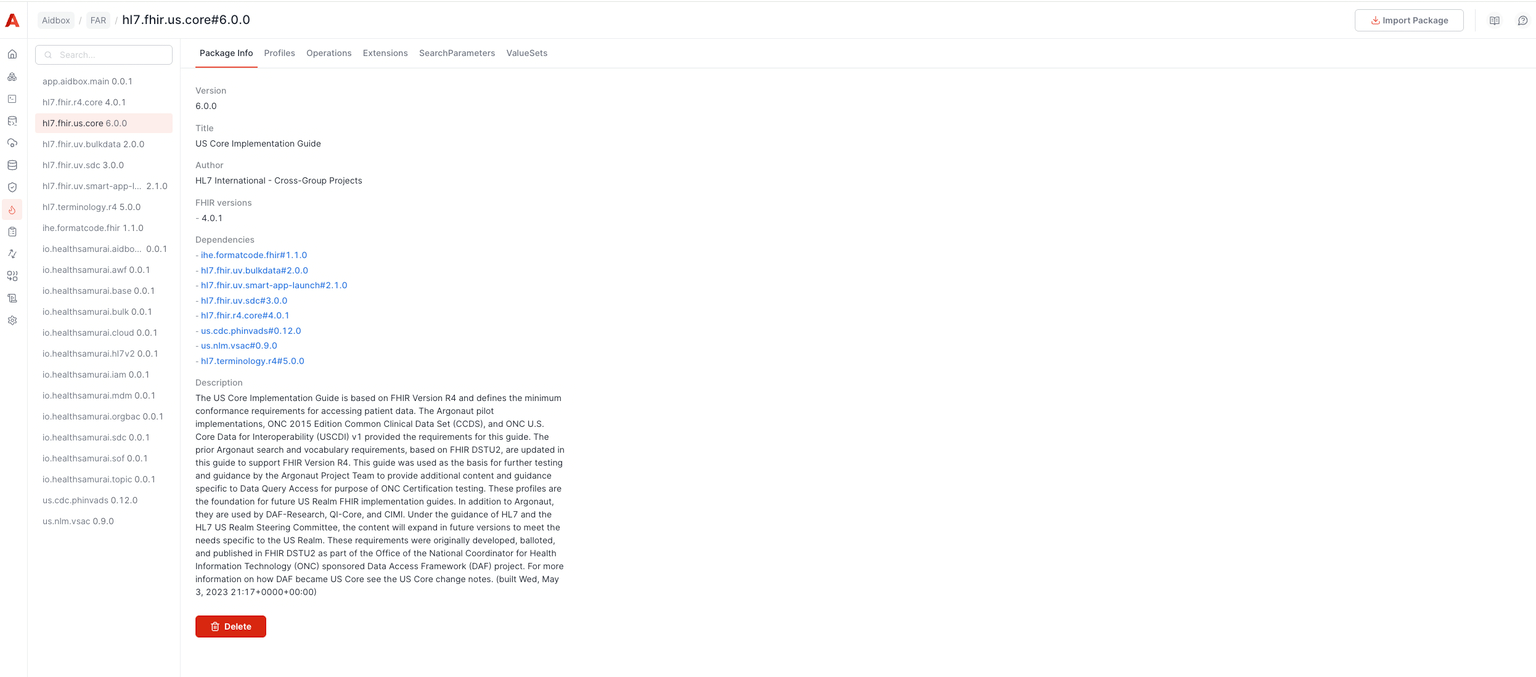
Aidbox provides a web-based interface for package management operations. Through this UI, you can import FHIR packages from external registries, view installed packages and their contents, and delete packages when no longer needed.
Registry Scope and Limitations
The current implementation of the Artifact Registry focuses on five core types of canonical resources: CodeSystem, ValueSet, ConceptMap, StructureDefinition, and SearchParameter. These resource types cover the most common use cases for FHIR validation, profiling, and terminology operations. Aidbox doesn't currently store other FHIR canonical resource types like NamingSystem or ImplementationGuide in the registry but may add in future releases based on user requirements.
See also:
Upload FHIR Implementation Guides to Aidbox using environment variables, UI, API, or local packages.
Extend standard FHIR resources with custom data elements through FHIR extensions.
Define custom resources with StructureDefinition or FHIR Schema for non-standard healthcare data.
Package Management
FHIR packages are collections of canonical resources bundled together with their dependencies, following a standardized format for distribution and versioning. In the context of the Artifact Registry, packages serve as the primary mechanism for importing and organizing canonical resources. Each package includes metadata about its contents, dependencies on other packages, and version information following semantic versioning principles.
The registry automatically loads all package dependencies when you import a package.
Integration with Package Registries
The Artifact Registry uses an NPM-compatible registry for package management. By default, Aidbox connects to https://fs.get-ig.org/pkgs, which synchronizes with the official FHIR packages repository.
You can configure a custom registry using the FHIR NPM Package registry setting. This allows you to:
- Use alternative public registries (e.g., Simplifier)
- Set up a local registry using Verdaccio or another NPM proxy/mirroring solution
- Host private packages in your own infrastructure
See also:
Upload an Implementation Guide by pointing Aidbox UI at a .tar.gz URL.
Load a FHIR Implementation Guide on startup through the Aidbox Init Bundle.
Group StructureDefinitions, SearchParameters, and other conformance resources into a distributable npm package.
Loading packages from local filesystem
This functionality is available in Aidbox versions 2601 and later.
To load FHIR packages from the local filesystem instead of fetching them from a remote NPM registry, mount a directory containing the packages to /srv/aidbox-fhir-packages in the Aidbox container.
Packages must be in .tgz format (gzipped tarball) and follow the naming convention {package-name}#{version}.tgz. For example, the package hl7.fhir.r4.core version 4.0.1 should be named hl7.fhir.r4.core#4.0.1.tgz.
When Aidbox loads a package, it will first check this local directory before attempting to download from the configured registry. This is useful for air-gapped environments, faster startup times, or when the remote registry is unavailable.
Make sure to put all the dependent packages in the same directory.
See also:
Pinning and Tree-Shaking
When you install FHIR Implementation Guide packages from a registry or direct URL, Aidbox downloads, validates, and installs the specified packages along with their dependencies. During this process, Aidbox performs pinning and tree-shaking on canonicals:
- Pinning: References inside canonicals are pinned to exact dependency versions as described in the FHIR IG Guidance on pinning.
- Tree-shaking: Only referenced canonical dependencies are installed from dependent packages, reducing redundancy.
The goal is to achieve a system state where every canonical <url>|<version> pair is unique and present only once.
Package Installation Flow
- Obtain all canonicals from the target packages.
- For each canonical, pin its outgoing canonical references using the selection algorithm.
Outgoing Reference Collection
References are collected using known paths for these resource types:
- StructureDefinition (excluding
snapshot) - CodeSystem
- ValueSet
- SearchParameter
- CapabilityStatement
For each canonical, Aidbox collects its outgoing canonical references. For each outgoing reference, a candidate list is constructed from all dependencies of the package (including transitive ones).
Candidate Selection Algorithm
When pinning canonical references, multiple versions or packages may provide the same canonical URL. The algorithm selects the best candidate using a multi-stage comparison chain.
Filtering: Candidates are filtered out if they match exclusion patterns (expansions, examples, search, elements, corexml, core) or are CodeSystem resources whose content is not "complete".
Comparison Chain: A chained comparator is applied in this prioritized order:
| Priority | Criterion | Description |
|---|---|---|
| 1 | Status | active > draft > retired > unknown |
| 2 | Terminology Wins Core | Terminology packages (e.g., hl7.terminology) override core packages |
| 3 | Version | Compared using detected algorithm: semver, integer, date, or alpha |
| 4 | lastUpdated | Final tiebreaker using meta.lastUpdated |
Version Algorithm Detection: Aidbox first checks for versionAlgorithmString or versionAlgorithmCoding. If not defined, it infers the algorithm by inspecting the version string format (integer, semver, date, or alpha fallback).
Recursive Pinning
Once a reference is pinned:
- It is added to the final canonical set.
- The same process is repeated recursively for its outgoing references.
- Each
<url>|<version>pair is processed only once due to caching.
This recursive collection results in a tree-shaken package: the system contains the full content of the target package, plus only the referenced canonicals (and their recursive dependencies) from dependency packages.
Versioning Strategy
Canonical resources can reference each other using versioned URLs (e.g., http://example.com/StructureDefinition/Patient|1.0.0). If you specify a version, the registry uses it exactly. Otherwise, it automatically picks the latest version.
Canonical matching in validation
Per FHIR R4 canonical matching rules, a canonical URL has two parts: the URL itself and an optional |<version> suffix. When validation compares a canonical pattern against a resource value (for example, a patternCanonical discriminator on meta.profile), the rules are:
- An unversioned pattern matches the URL regardless of the value's version suffix.
- A versioned pattern requires both the URL and the version to match exactly.
See FHIR Schema Validator → Slicing on canonical arrays for the validator behavior, including a current limitation around unversioned patterns matching versioned values.
$current-canonical Operation
The $current-canonical operation returns the most current version of a canonical resource with the specified URL. This operation implements the FHIR $current-canonical specification.
Usage
The operation supports both type-level and system-level invocation:
Type-level (when you know the resource type):
GET /fhir/StructureDefinition/$current-canonical?url=http://hl7.org/fhir/StructureDefinition/Patient
System-level (searches across all canonical resource types):
GET /fhir/$current-canonical?url=http://hl7.org/fhir/StructureDefinition/Patient
Parameters
| Parameter | Cardinality | Type | Description |
|---|---|---|---|
| url | 1..1 | uri | The canonical URL (with no version declared) |
| status | 0..* | code | Optional filter for specific statuses. When omitted, any status is acceptable |
POST Request
You can also invoke the operation using POST with a Parameters resource:
POST /fhir/StructureDefinition/$current-canonical
Content-Type: application/fhir+json

{
  "resourceType": "Parameters",
  "parameter": [
    {
      "name": "url",
      "valueUri": "http://hl7.org/fhir/StructureDefinition/Patient"
    }
  ]
}
Response
On success, the operation returns a Parameters resource containing the resolved canonical:
{
  "resourceType": "Parameters",
  "parameter": [
    {
      "name": "result",
      "resource": {
        "resourceType": "StructureDefinition",
        "id": "Patient",
        "url": "http://hl7.org/fhir/StructureDefinition/Patient",
        "version": "4.0.1",
        "status": "active"
      }
    }
  ]
}
If no matching resource is found, the operation returns a 404 status with an OperationOutcome.
Version Selection
When multiple versions of a canonical exist, the operation uses the candidate selection algorithm to determine the current version.
See also: