
SMART: Scopes for Limiting Access
This functionality is available starting from version 2411.
The FHIR Schema Validator Engine must be enabled.
Aidbox fully supports version 1 of SMART on FHIR scopes:
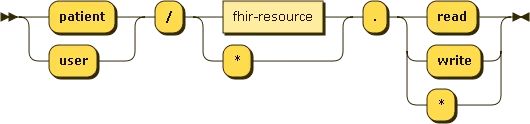
And version 2 of SMART on FHIR scopes, including search parameters in scopes:

If a requested operation is not permitted by the scopes, Aidbox will deny access. If access is granted, Aidbox will retrieve and return only the data allowed by the specified scopes and context.
Access Token
For Aidbox to enforce scopes, the JWT access token must contain the following claims:
| Claim name | Value type | Description |
|---|---|---|
atv * | valueInteger | Access Token Version. Aidbox enforces the scope claim only when this is 2. |
scope * | valueString | String with scopes separated by space. |
context.patient | valueString or array | Patient ID. Since 2607 an array of {"id": ...} and {"url": ...} entries is also accepted, see Patient context. |
* - required claim
atv and context.patient are Aidbox-specific claims. The SMART App Launch specification does not define them: it passes the patient context as a patient parameter next to the access token in the token response, while Aidbox needs it inside the token itself so that scopes can be enforced no matter which server issued it.
atv is the version of the Aidbox access token, not the version of the SMART scope syntax. Both v1 scopes (patient/Observation.read) and v2 scopes (patient/Observation.rs) are enforced when atv is 2.
If atv is missing or holds any other value, Aidbox never reads the scope claim. The token is still accepted, but the request is decided by Access Policies alone and the scopes restrict nothing.
Aidbox adds atv and scope to the tokens it issues for a Client of type: smart-app. An identity provider that issues tokens itself must add the atv claim on its own.
For scope checking, Aidbox accepts any valid JWT tokens issued by external servers if they contain the specified scopes and Aidbox can issue its own JWT tokens with all the required claims.
Example: parsed access token
Parsed payload of the access token used in the examples on this page:
{
  "atv": 2,
  "aud": "https://example.edge.aidbox.app/fhir",
  "sub": "3d0efb80-9019-47a1-b361-e04538d871fe",
  "iss": "https://auth.example.com",
  "exp": 1733238248,
  "scope": "launch/patient openid fhirUser offline_access patient/Patient.read patient/Observation.read",
  "jti": "53ed516a-3c81-4dcd-9551-7e953a93fc0e",
  "context": {
    "patient": "test-pt-1"
  },
  "iat": 1733234648
}
Patient context
context.patient holds the patient the token is scoped to. Aidbox uses it to decide which resources belong to the patient compartment when patient/ scopes are granted.
A plain string is the patient ID:
"context": {
  "patient": "pt1"
}
Since 2607 the claim also accepts an array of references. Each entry is either {"id": ...} or {"url": ...}, and any number of entries is permitted:
"context": {
  "patient": [
    {"id": "pt1"},
    {"url": "https://example.com/some/path/Patient/pt1"}
  ]
}
Use the url form when resources store the patient reference as an absolute URL, for example:
resourceType: Basic
subject:
  reference: https://example.com/some/path/Patient/pt1
A resource belongs to the compartment if it matches any of the listed entries: an id entry matches a relative reference like Patient/pt1, a url entry matches an absolute reference equal to that URL. URLs are compared as exact strings — the scheme, host, path and trailing slash must match the stored reference.
Scopes and Access Policies
Scopes do not replace Access Policies. A request must pass both checks, in this order:
- Scope check. If the granted scopes do not cover the requested resource type and interaction, the request is denied with
403. - Access Policy check. Policies are evaluated as usual, and access is denied by default. If no policy grants the request, it is denied with
403— scopes alone never grant access. - Data filtering. For a granted request, the patient compartment and the scope search parameters are applied to the query, so only the allowed data is read or written.
Scope enforcement
A request is denied when no granted scope covers the requested resource type and interaction.
Denied request based on allowed scopes:
GET /fhir/Appointment/my-appointment
content-type: application/json
accept: application/json
// Token with "patient/Patient.read patient/Observation.read" scopes
Authorization: "Bearer eyJhbGciOiJIUzI1NiIsInR5cCI6IkpXVCJ9.eyJhdHYiOjIsImF1ZCI6Imh0dHBzOi8vZXhhbXBsZS5lZGdlLmFpZGJveC5hcHAvZmhpciIsInN1YiI6IjNkMGVmYjgwLTkwMTktNDdhMS1iMzYxLWUwNDUzOGQ4NzFmZSIsImlzcyI6Imh0dHBzOi8vYXV0aC5leGFtcGxlLmNvbSIsImV4cCI6MTczMzIzODI0OCwic2NvcGUiOiJsYXVuY2gvcGF0aWVudCBvcGVuaWQgZmhpclVzZXIgb2ZmbGluZV9hY2Nlc3MgcGF0aWVudC9QYXRpZW50LnJlYWQgcGF0aWVudC9PYnNlcnZhdGlvbi5yZWFkIiwianRpIjoiNTNlZDUxNmEtM2M4MS00ZGNkLTk1NTEtN2U5NTNhOTNmYzBlIiwiY29udGV4dCI6eyJwYXRpZW50IjoidGVzdC1wdC0xIn0sImlhdCI6MTczMzIzNDY0OH0.O0iNxkutQxAPgGmDSmNikVXlr8Tl9w9_FJdcINI7Cbw"
// Forbidden because the token doesn't have Appointment/read scope
{
  "resourceType": "OperationOutcome",
  "id": "forbidden",
  "text": {
    "status": "generated",
    "div": "Forbidden"
  },
  "issue": [
    {
      "severity": "fatal",
      "code": "forbidden",
      "diagnostics": "Forbidden"
    }
  ]
}
Permitted request based on allowed scopes:
GET /fhir/Patient/test-pt-1
content-type: application/json
accept: application/json
// Token with "patient/Patient.read patient/Observation.read" scopes
Authorization: "Bearer eyJhbGciOiJIUzI1NiIsInR5cCI6IkpXVCJ9.eyJhdHYiOjIsImF1ZCI6Imh0dHBzOi8vZXhhbXBsZS5lZGdlLmFpZGJveC5hcHAvZmhpciIsInN1YiI6IjNkMGVmYjgwLTkwMTktNDdhMS1iMzYxLWUwNDUzOGQ4NzFmZSIsImlzcyI6Imh0dHBzOi8vYXV0aC5leGFtcGxlLmNvbSIsImV4cCI6MTczMzIzODI0OCwic2NvcGUiOiJsYXVuY2gvcGF0aWVudCBvcGVuaWQgZmhpclVzZXIgb2ZmbGluZV9hY2Nlc3MgcGF0aWVudC9QYXRpZW50LnJlYWQgcGF0aWVudC9PYnNlcnZhdGlvbi5yZWFkIiwianRpIjoiNTNlZDUxNmEtM2M4MS00ZGNkLTk1NTEtN2U5NTNhOTNmYzBlIiwiY29udGV4dCI6eyJwYXRpZW50IjoidGVzdC1wdC0xIn0sImlhdCI6MTczMzIzNDY0OH0.O0iNxkutQxAPgGmDSmNikVXlr8Tl9w9_FJdcINI7Cbw"
// 200 OK because the token has Patient/read scope
{
  "name": [
    {
      "given": [
        "Amy",
        "V."
      ],
      "family": "Shaw",
      "period": {
        "end": "2020-07-22",
        "start": "2016-12-06"
      }
    }
  ],
  "birthDate": "1987-02-20",
  "resourceType": "Patient",
  "active": true,
  "id": "test-pt-1",
  "gender": "female",
  "birthsex": "F"
}
Scopes with search parameters
This functionality is available starting from version 2509.
SMART on FHIR v2 supports finer-grained access control by allowing FHIR search parameters to be embedded in scopes. In Aidbox, you can append a query string to a scope to restrict what a client can read/search.
Example: filtering reads
patient/Observation.rs?status=final - Grants read & search access only to Observation resources whose status is final. Any request such as GET /fhir/Observation (or other Observation searches) will be automatically filtered to include only status=final results.
You can combine as many search parameters and scopes as you want using FHIR search syntax, except for complex search parameters like _include, _revinclude, _has, _assoc, _with.
Write permissions
Search parameters in scopes with create/update/delete permissions are supported starting from version 2608. Earlier versions reject such scopes.
Search parameters constrain every interaction listed in the scope, not only read and search. For example, patient/Basic.cruds?code=http://example.org|app-state means:
- create — the submitted resource must match the search parameters, otherwise the request is denied with
403. - update — both the stored resource and the submitted one must match. A client can neither take over a resource that lies outside the scope, nor move a resource out of it.
- delete — only resources matching the search parameters can be deleted.
- read, search — results are filtered as described above.
Limitations
Search parameters are not allowed in:
system/level scopes;- scopes with a wildcard resource type, such as
user/*.cruds?status=final; - scopes with SMART v1 permissions —
read,write,*.
A scope that violates these rules makes Aidbox reject the whole token.
Scopes in transaction bundles
SMART does not define specific scopes for batch or transaction interactions. Aidbox allows Bundle requests regardless of scopes and applies Access Control restrictions to each element within Bundle.entry. This means that while the Bundle as a whole is accepted, Aidbox enforces scope Access Control restrictions on each entry in the Bundle.
Example: entry-level enforcement
POST /fhir
content-type: application/json
accept: application/json
// Token with "patient/Patient.read patient/Observation.read" scopes
Authorization: "Bearer eyJhbGciOiJIUzI1NiIsInR5cCI6IkpXVCJ9.eyJhdHYiOjIsImF1ZCI6Imh0dHBzOi8vZXhhbXBsZS5lZGdlLmFpZGJveC5hcHAvZmhpciIsInN1YiI6IjNkMGVmYjgwLTkwMTktNDdhMS1iMzYxLWUwNDUzOGQ4NzFmZSIsImlzcyI6Imh0dHBzOi8vYXV0aC5leGFtcGxlLmNvbSIsImV4cCI6MTczMzIzODI0OCwic2NvcGUiOiJsYXVuY2gvcGF0aWVudCBvcGVuaWQgZmhpclVzZXIgb2ZmbGluZV9hY2Nlc3MgcGF0aWVudC9QYXRpZW50LnJlYWQgcGF0aWVudC9PYnNlcnZhdGlvbi5yZWFkIiwianRpIjoiNTNlZDUxNmEtM2M4MS00ZGNkLTk1NTEtN2U5NTNhOTNmYzBlIiwiY29udGV4dCI6eyJwYXRpZW50IjoidGVzdC1wdC0xIn0sImlhdCI6MTczMzIzNDY0OH0.O0iNxkutQxAPgGmDSmNikVXlr8Tl9w9_FJdcINI7Cbw"

{
  "resourceType": "Bundle",
  "type": "batch",
  "entry": [
    {
      "request": {
        "method": "GET",
        "url": "Encounter"
      }
    },
    {
      "request": {
        "method": "GET",
        "url": "Patient/test-pt-1"
      }
    }
  ]
}
// 200 OK
{
  "type": "batch-response",
  "resourceType": "Bundle",
  "entry": [
    // first entry is Forbidden because token doesn't have
    // patient.Encounter/read scope
    {
      "resource": {
        "resourceType": "OperationOutcome",
        "id": "forbidden",
        "text": {
          "status": "generated",
          "div": "Forbidden"
        },
        "issue": [
          {
            "severity": "fatal",
            "code": "forbidden",
            "diagnostics": "Forbidden"
          }
        ]
      },
      "response": {
        "status": "403"
      }
    },
    // second entry is allowed because
    // token has patient/Patient.read scope
    {
      "resource": {
        "name": [
          {
            "given": [
              "Amy",
              "V."
            ],
            "family": "Shaw",
            "period": {
              "end": "2020-07-22",
              "start": "2016-12-06"
            }
          }
        ],
        "birthDate": "1987-02-20",
        "resourceType": "Patient",
        "active": true,
        "id": "test-pt-1",
        "gender": "female",
        "birthsex": "F"
      }
    }
  ]
}
Patient-level access with SMART scopes
Patient-level access control in Aidbox enables restricting data access to resources associated with a specific patient. When users interact with the FHIR API, they can access only the resources that belong to that patient.
To achieve this behavior, the request must include:
- A valid JWT access token.
- Only patient-level scopes (
patient/...). - The patient ID in the
context.patientclaim.
Aidbox will limit access and filter retrieved data based on FHIR Patient CompartmentDefinition.
Aidbox also restricts access to a single patient without SMART scopes, using a session bound to a patient or the X-Patient-id header. That mechanism is described on a separate page:
Example: filtered search
// Search over all Observations
GET /fhir/Observation
content-type: application/json
accept: application/json
// Token with "patient/Observation.read" scope and "context.patient" = "test-pt-1"
Authorization: "Bearer eyJhbGciOiJIUzI1NiIsInR5cCI6IkpXVCJ9.eyJhdHYiOjIsImF1ZCI6Imh0dHBzOi8vZXhhbXBsZS5lZGdlLmFpZGJveC5hcHAvZmhpciIsInN1YiI6IjNkMGVmYjgwLTkwMTktNDdhMS1iMzYxLWUwNDUzOGQ4NzFmZSIsImlzcyI6Imh0dHBzOi8vYXV0aC5leGFtcGxlLmNvbSIsImV4cCI6MTczMzIzODI0OCwic2NvcGUiOiJsYXVuY2gvcGF0aWVudCBvcGVuaWQgZmhpclVzZXIgb2ZmbGluZV9hY2Nlc3MgcGF0aWVudC9QYXRpZW50LnJlYWQgcGF0aWVudC9PYnNlcnZhdGlvbi5yZWFkIiwianRpIjoiNTNlZDUxNmEtM2M4MS00ZGNkLTk1NTEtN2U5NTNhOTNmYzBlIiwiY29udGV4dCI6eyJwYXRpZW50IjoidGVzdC1wdC0xIn0sImlhdCI6MTczMzIzNDY0OH0.O0iNxkutQxAPgGmDSmNikVXlr8Tl9w9_FJdcINI7Cbw"
// 200 OK Return Observation only
// with reference to "test-pt-1" Patient (from "context.patient" claim)

{
  "resourceType": "Bundle",
  "type": "searchset",
  "total": 3,
  "entry": [
    {
      "resource": {
        "resourceType": "Observation",
        "id": "test-blood-pressure",
        "status": "final",
        "code": {
          "text": "Blood pressure systolic and diastolic",
          "coding": [
            {
              "code": "85354-9",
              "system": "http://loinc.org",
              "display": "Blood pressure panel with all children optional"
            }
          ]
        },
        "subject": {
          "reference": "Patient/test-pt-1"
        }
      }
    },
    {
      "resource": {
        "resourceType": "Observation",
        "id": "test-heart-rate",
        "status": "final",
        "code": {
          "text": "heart_rate",
          "coding": [
            {
              "code": "8867-4",
              "system": "http://loinc.org",
              "display": "Heart Rate"
            }
          ]
        },
        "subject": {
          "reference": "Patient/test-pt-1"
        }
      }
    },
    {
      "resource": {
        "resourceType": "Observation",
        "id": "test-height",
        "status": "final",
        "code": {
          "text": "height",
          "coding": [
            {
              "code": "8302-2",
              "system": "http://loinc.org",
              "display": "Body height"
            }
          ]
        },
        "subject": {
          "reference": "Patient/test-pt-1"
        }
      }
    }
  ]
}