


Why the baseline matters
Before we compare FHIR servers under load, we need a clean starting point. The baseline tells us how the systems behave on an empty (or nearly empty) database and gives us a reference for everything that comes later — when data volume and traffic start to matter.
As we said in our previous post, we focus on the core FHIR workloads: CRUD, Bundle processing, and Search. The whole benchmark is open source — the source code, the test harness, and the results all live in github.com/HealthSamurai/fhir-server-performance-benchmark, and the run is re-executed daily, so the interactive report (every chart plus the raw data) always reflects the latest numbers. The figures quoted in this post come from the run of June 28, 2026; the live report is the source of truth.
We test four FHIR servers: Aidbox, HAPI FHIR, Medplum, and the Microsoft FHIR Server. They span three different runtimes and two different databases. Aidbox and HAPI both run on the JVM over PostgreSQL; Medplum runs on Node.js, also over PostgreSQL; and the Microsoft FHIR Server runs on .NET and is the odd one out on storage — it doesn't support PostgreSQL, so we run the latest Microsoft FHIR Server on SQL Server.
| Server | Code base | Runtime | Database |
|---|---|---|---|
| Aidbox | closed source | JVM (Clojure) | PostgreSQL |
| HAPI FHIR | open source | JVM (Java) | PostgreSQL |
| Medplum | open source | Node.js | PostgreSQL |
| Microsoft FHIR Server | open source | .NET (C#) | SQL Server |
The Microsoft FHIR Server is the most recent addition to the benchmark, and the results below now include it alongside the three PostgreSQL-backed servers.
Test environment
Our testing runs on a single bare-metal machine with 64 CPU cores and 500 GB of RAM. The whole stack is orchestrated with Docker Compose, and resources are pinned per container so the comparison stays fair:
| Server | Image | CPU / RAM | Topology |
|---|---|---|---|
| Aidbox | healthsamurai/aidboxone:edge | 8 vCPU / 24 GB | single instance (JVM) |
| HAPI FHIR | hapiproject/hapi:latest | 8 vCPU / 24 GB | single instance (JVM) |
| Medplum | medplum/medplum-server:latest | 1 vCPU / 3 GB each | 8 replicas (Node.js) |
| Microsoft FHIR Server | mcr.microsoft.com/healthcareapis/r4-fhir-server:latest | 8 vCPU / 24 GB | single instance (.NET) |
Every application server gets the same budget: 8 vCPU and 24 GB of RAM. Medplum reaches it differently — its Node.js runtime is single-threaded, so a single process cannot use 8 cores; it is scaled out as 8 replicas of 1 vCPU / 3 GB each (8 vCPU and 24 GB in total) to compete on equal footing. Medplum additionally relies on Redis for sessions and caching, which the others do not need.
For the three PostgreSQL-based servers the database layer is PostgreSQL 18 (8 vCPU / 30 GB), shared across the stack but isolated with a database-per-server model so no server's storage or query load can affect another's. The Microsoft FHIR Server cannot run on PostgreSQL, so it gets its own dedicated SQL Server 2022 (Developer edition) on the same 8 vCPU / 30 GB budget — the SQL Server counterpart to the shared Postgres. Because the suites run sequentially, only one application server and its database are active at a time. Everything runs on local NVMe SSD storage to remove network latency from the results and keep the dataset close to the server.
For load generation we use Grafana k6, which runs the scenarios in sequence (prewarm → CRUD → import → search). For synthetic data we use Synthea because it produces realistic healthcare data patterns. Per-container CPU, memory, and I/O are collected with cAdvisor, while database internals come from postgres-exporter (for the PostgreSQL servers) and mssql-exporter (for the Microsoft FHIR Server's SQL Server). All of it is aggregated by Prometheus and visualized in Grafana — the same metrics that back the charts below. Full details are on the infrastructure page of the report.
A note on fairness. We build Aidbox, so naturally we know it best. We are not experts in HAPI FHIR, Medplum, or the Microsoft FHIR Server, and it is entirely possible that our configuration for them is not optimal. Our goal was the opposite of cherry-picking: maximize hardware utilization and give every server the most equal resources we reasonably could. The whole setup is open source for exactly this reason — if you know how to tune any of these servers better, we genuinely want to know. Open an issue or a pull request against the benchmark repo and the daily run will pick up your changes.
Test suites and scenarios
Performance testing is crucial for understanding system behavior under load. For this baseline we run three suites, in order:
- CRUD on an empty database
- Measure Create, Read, Update, and Delete performance on a fresh installation
- Batch import (1K patients)
- Perform a batch import of 1,000 synthetic (Synthea) patient records and measure throughput and storage
- Search
- Evaluate search operations performance against the imported dataset
This gives us a clean reference point. Larger datasets and incremental load — where write degradation and complex queries start to matter — are the subject of the next posts in the series.
Baseline CRUD performance
The CRUD suite contains sequential Create, Read, Update, and Delete operations over nine different FHIR resources: Patient, Location, Practitioner, Organization, Encounter, MedicationRequest, Observation, Claim, and ExplanationOfBenefit. The suite runs with a constant 300 concurrent threads for up to 5 minutes.
We establish baseline metrics with the average RPS over all iterations.
Average throughput (RPS) across all CRUD operations (higher is better)
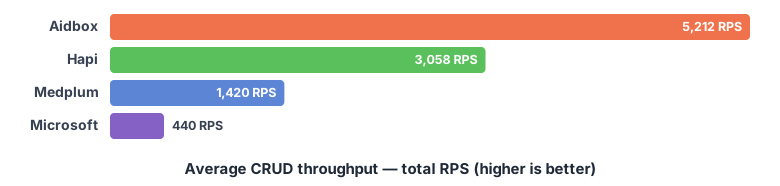
| Server | Total CRUD throughput (RPS) |
|---|---|
| Aidbox | 5,212 |
| HAPI | 3,058 |
| Medplum | 1,420 |
| Microsoft FHIR Server | 440 |
Average latency (99th percentile) by operation (lower is better)
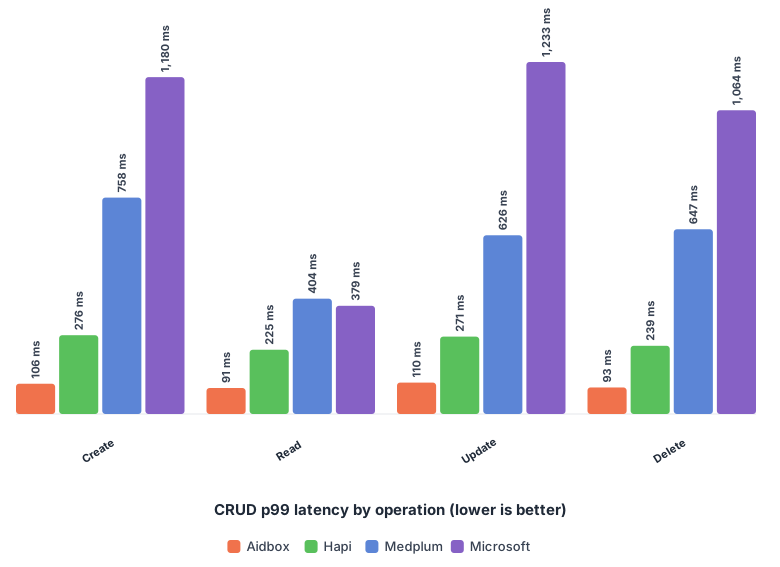
| Operation | Aidbox | HAPI | Medplum | Microsoft |
|---|---|---|---|---|
| Create | 106 ms | 276 ms | 758 ms | 1,180 ms |
| Read | 91 ms | 225 ms | 404 ms | 379 ms |
| Update | 110 ms | 271 ms | 626 ms | 1,233 ms |
| Delete | 93 ms | 239 ms | 647 ms | 1,064 ms |
Based on these results, Aidbox delivers about 70% more throughput than HAPI and roughly 3.7x more than Medplum. The Microsoft FHIR Server is far behind on this suite, at 440 RPS — more than an order of magnitude below Aidbox. On latency, Aidbox is around 2.5x faster than HAPI and 6x faster than Medplum at the 99th percentile. The Microsoft FHIR Server is an interesting case: its reads are quick (379 ms p99, even ahead of Medplum), but its writes are the slowest of the group (~1.2 s p99 on create and update), which drags its overall throughput down.
One thing to keep in mind when reading these numbers: the throughput gap (≈70% over HAPI) is smaller than the latency gap (≈2.5x). Under high concurrency a server can hold up aggregate throughput by processing many requests in parallel even when each individual request is slower, so tail latency and total RPS don't necessarily move together — a single-number comparison can hide which one a given workload actually cares about.
Average latency over all operations (99th percentile) by resource size (lower is better)
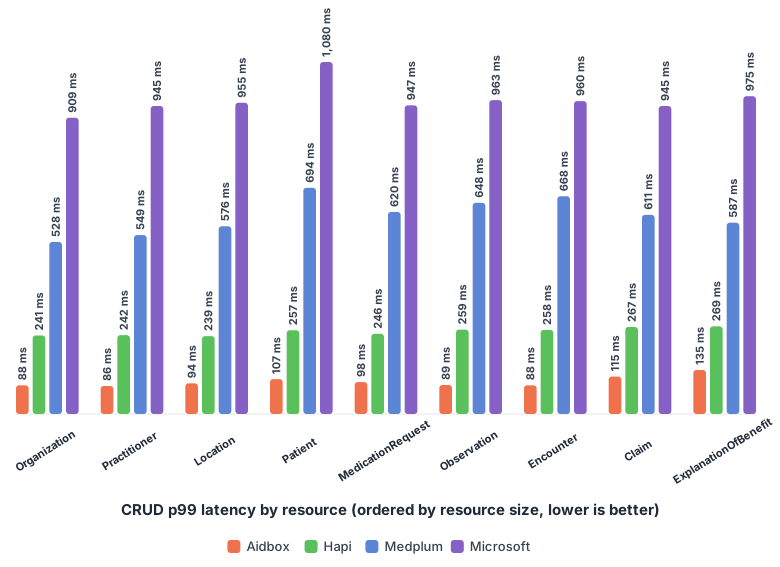
The chart shows that Aidbox has a slight correlation between latency and resource size, most visible when processing Encounter, Patient, and ExplanationOfBenefit resources. HAPI shows more constant latency across resource sizes, while Medplum and the Microsoft FHIR Server are uniformly high on writes. We also see an interesting spike on Patient processing by Medplum (its create p99 jumps to ~1.16 s, versus ~560–830 ms for other resources), which suggests some extra work happens specifically for the Patient resource.
Batch processing
To test batch processing capabilities, we used a dataset of 1,000 synthetic patient records generated with Synthea (around 2 million resources in total). The generated FHIR Bundles vary in size, ranging from small bundles around 150 KB to large ones up to 120 MB and up to 50,000 resources in a single bundle. Each Bundle has type transaction. To make the test more realistic and closer to real-world usage, we ran 20 concurrent threads processing these bundles.
Average throughput (resources per second) by server (higher is better)
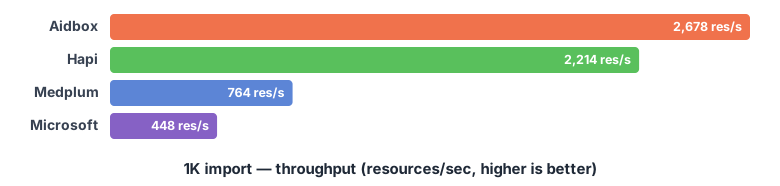
| Server | Import throughput (resources/sec) |
|---|---|
| Aidbox | 2,678 |
| HAPI | 2,214 |
| Medplum | 764 |
| Microsoft FHIR Server | 448 |
On batch processing, Aidbox and HAPI lead and trade the top spot between runs — in this one Aidbox is ahead, ingesting 2,678 resources per second to HAPI's 2,214 (about 21% faster). Medplum lags well behind both at 764 resources per second, and the Microsoft FHIR Server is the slowest at 448 resources per second — roughly 5–6x behind the two JVM servers.
Database size by server (lower is better)
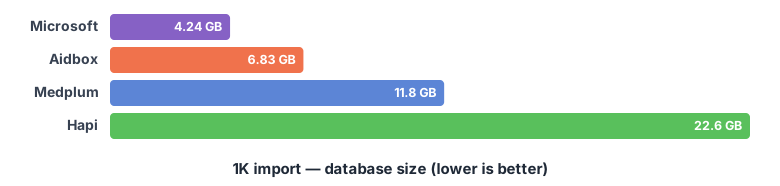
Storage is where the four servers spread out the most, into two rough camps. The Microsoft FHIR Server (4.24 GB) and Aidbox (6.83 GB) stay compact; Medplum (11.8 GB) and HAPI (22.6 GB) are markedly larger — HAPI's footprint is about 3.3x Aidbox's. The two compact servers get there differently: Aidbox by not pre-building indexes, the Microsoft FHIR Server on its SQL Server datastore — yet, as we saw above, the Microsoft server pays for it elsewhere, in slow writes and searches. We return to the index tradeoff in the conclusion.
Search suite
Benchmarking search functionality in a FHIR server comprehensively is a complex challenge for several reasons:
- FHIR has an extensive set of search parameters, making it time-consuming to benchmark them all.
- There are many combinations of search parameter type and value type.
- Various modifiers and prefixes can be applied to searches.
- There are complex operations like joins (
_include,_revinclude,_has, chained) and sorting. - The number of possible search parameter combinations is vast.
Since testing every possible search parameter combination is impractical, we focus on the most commonly used search parameters. This gives us a solid baseline understanding of how efficiently each server implements its search logic. We concentrate on standard FHIR R4 search parameters that are frequently used in practice and have corresponding data in our synthetic dataset, covering six families: string, date, reference, quantity, token, and FHIR composite parameters.
We run the suite with 30 concurrent threads (k6 VUs) for 2 minutes, using a fixed page size of 20 results (_count=20). Since search operations can return large result sets, we exclude response transfer and parsing time from the measurements by enabling the discardResponseBodies: true k6 setting — we focus solely on server response time, not on FHIR conformance. All search families run mixed in a single iteration rather than sequentially, which is closer to real-world usage. Each family also fires a deliberately non-matching value (a non-existent id, code, or name) to exercise the empty-result path, and reference values are sampled live from each server (real resource ids) right before the run.
One caveat follows from discarding response bodies: we measure response time, not correctness. A server that mishandles a query type — returning an error, or an unfiltered result, quickly — can look artificially fast. We flag the one case we found (Medplum's composite search, below), but the same skepticism applies across the board: treat any unusually low latency for a given server-and-type as something to verify against the live results rather than take at face value.
The parameters we exercise:
| Search type | Resource | Parameters |
|---|---|---|
| String | Patient | name, address (with :contains) |
| String | Organization | name (with :contains) |
| Date | Patient | birthdate |
| Date | Observation | date |
| Date | Encounter | date |
| Reference | Observation | subject, encounter, performer |
| Reference | Encounter | subject, participant |
| Reference | MedicationRequest | subject, encounter, requester |
| Quantity | Observation | value-quantity, component-value-quantity, combo-value-quantity |
| Token | Observation | category, code |
| Token | Encounter | status, class |
| Composite | Observation | code-value-quantity, component-code-value-quantity, combo-code-value-quantity |
Date and quantity searches rotate through prefixes (eq, lt, gt, ge, le; date also adds sa and eb). String searches use the :contains modifier. Token searches cover plain [code], fully-qualified [system]|[code], and comma-separated OR lists. Composite searches use FHIR composite parameters with the $ separator (for example code-value-quantity=8867-4$gt100).
Search results
Total search throughput (RPS, higher is better)
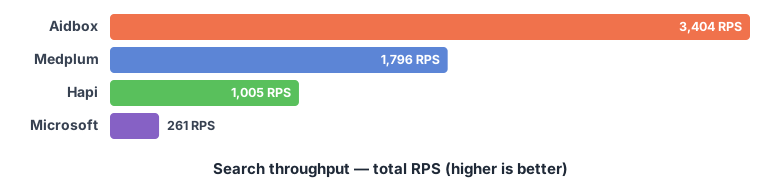
| Server | Search throughput (RPS) |
|---|---|
| Aidbox | 3,404 |
| Medplum | 1,796 |
| HAPI | 1,005 |
| Microsoft FHIR Server | 261 |
P99 latency by search type (ms, lower is better)
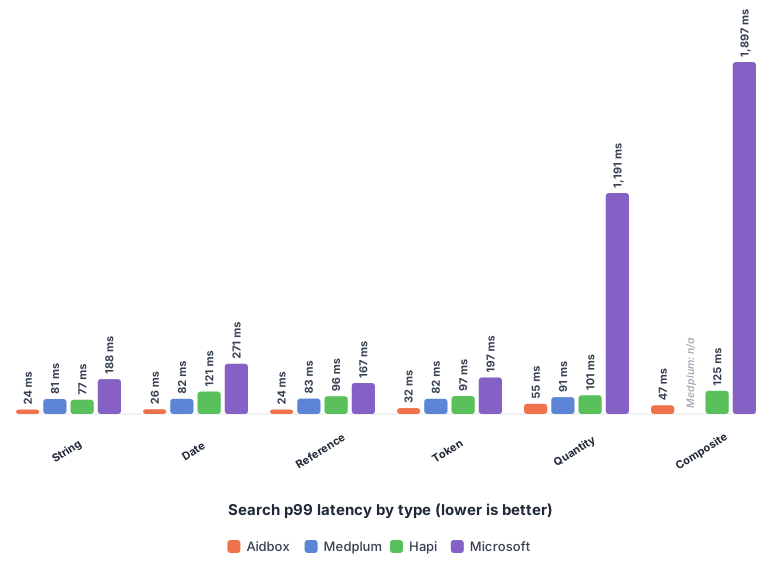
| Search type | Aidbox | Medplum | HAPI | Microsoft |
|---|---|---|---|---|
| String | 24 | 81 | 77 | 188 |
| Date | 26 | 82 | 121 | 271 |
| Reference | 24 | 83 | 96 | 167 |
| Token | 32 | 82 | 97 | 197 |
| Quantity | 55 | 91 | 101 | 1,191 |
| Composite | 47 | — | 125 | 1,897 |
The chart shows all four servers. The Microsoft FHIR Server's quantity (~1.2 s) and composite (~1.9 s) p99 run off the scale and squash the three PostgreSQL servers into short bars near the baseline — their exact values are in the table above. Medplum is absent from the composite group because it does not support that search type (see below).
The ordering changes compared to CRUD. On search, Aidbox leads throughput at 3,404 RPS — about 90% more than Medplum (1,796 RPS) and roughly 3.4x more than HAPI (1,005 RPS). The Microsoft FHIR Server is far behind at 261 RPS. Notably, HAPI — which was second on CRUD — is the slowest of the three PostgreSQL servers on search, both on throughput and on tail latency.
On latency, Aidbox returns the lowest p99 on every search family. Medplum is consistently in the middle — except on composite, which it does not support (see the note below). Among the Postgres servers, HAPI's latency is the highest, hovering around 95–125 ms across families. The Microsoft FHIR Server is in a different regime entirely: tolerable on string, date, reference, and token searches (~170–270 ms) but extremely slow on quantity (~1.2 s) and composite (~1.9 s) searches — which is exactly what sinks its search throughput.
Medplum does not support composite search. Medplum's search architecture documentation lists the FHIR
compositeparameter type as unsupported. In the benchmark, these requests return without performing the search, so any latency or throughput they report is an artifact rather than a real measurement — which is why Medplum appeared to "beat" everyone on composite in earlier drafts. We therefore leave Medplum's composite cell blank and drop it from the chart. Quantity search, by contrast, is supported by Medplum, so those numbers stand.
A note on scope: this baseline does not include sorting (_sort) or join operations (_include, _revinclude, _has, chained). They are most interesting once data volume grows — on a 1K-patient dataset almost everything fits in memory — so we add them on larger datasets in a later post.
Conclusion
On a clean, mostly in-memory baseline the standings line up like this — they shift somewhat between daily runs, so read them as a snapshot, not a verdict:
- CRUD — Aidbox leads throughput (5,212 RPS) over HAPI (3,058) and Medplum (1,420), with the best p99 latency on every operation (~100 ms vs ~250 ms for HAPI and ~610 ms for Medplum). The Microsoft FHIR Server trails at 440 RPS, with fast reads but ~1.2 s write latency.
- Batch import — Aidbox leads ingestion this run (2,678 vs HAPI's 2,214 resources/sec); Medplum is well behind (764), and the Microsoft FHIR Server is the slowest (448).
- Search — Aidbox leads both throughput (3,404 RPS) and per-query latency; HAPI drops to last among the Postgres servers, and the Microsoft FHIR Server is far behind on throughput (261 RPS), sunk by very slow quantity and composite queries.
- Storage — two camps: the Microsoft FHIR Server (4.24 GB) and Aidbox (6.83 GB) are compact, while Medplum (11.8 GB) and HAPI (22.6 GB) are larger — HAPI's footprint is about 3.3x Aidbox's.
Indexing strategy: a tradeoff this baseline only half-measures
The storage and import numbers follow directly from how each server stores and indexes data — and that choice is a tradeoff, not a verdict.
HAPI, Medplum, and the Microsoft FHIR Server pre-build indexes on searchable fields as data is written. That costs write throughput, and for HAPI and Medplum it costs storage (the 12–23 GB above). The Microsoft FHIR Server shows the storage cost isn't inevitable — it pre-builds indexes and still stays at 4.24 GB — but it pays heavily in write latency.
Aidbox takes the opposite default, and it cuts both ways. It ships with no search indexes at all — which is what makes its imports fast and its footprint small, but it also means an unindexed query falls back to a sequential scan, and the responsibility for indexing moves onto you. That is not a trivial job: you have to know which search parameters your workload actually hits, and over-indexing brings back exactly the write and storage costs we just described. What Aidbox offers in place of pre-built indexes is the tooling to do it deliberately — query analytics, statistics on which search parameters are actually used, and index recommendations derived from real traffic. Used well, that lets you index precisely for your workload and get both fast operations and a very compact, efficiently stored dataset; used carelessly, you get a server with no indexes. It is a more powerful default in expert hands and a sharper edge in inexperienced ones.
The important caveat — and the reason to read the search numbers above carefully — is that pre-building indexes buys something: predictable query performance as data grows. A 1K-patient dataset that fits comfortably in memory is precisely the case where that payoff doesn't show up, so this baseline structurally flatters the no-index default on search. Whether that advantage holds as data grows — and whether write-time degradation, not just raw speed, starts to dominate — is exactly what the next post is designed to measure.
Next in the series
This is the starting point. In the next posts we move from the baseline to heavier workloads — larger datasets and incremental load — to measure how import speed degrades as data accumulates, how CRUD and complex search (sorting and joins) hold up on a full database, and how the storage gap projects at realistic data volumes.
Follow us on LinkedIn for the next benchmark update.