


Prior authorization is a persistent friction point in US healthcare, and the pressure to measure it keeps growing: payers want to see where it stalls, and reporting it is on track to become a regulatory requirement. That means measuring submission volume, error rate, time to a decision.
The Da Vinci PAS IG names
ten operational metrics
and ships a
PASMetricData
logical model that suggests the data the metrics draw on.
Computing them usually means copying the data into a separate analytics system and rebuilding each metric there, custom work that gets redone at every site and drifts from the source. We wanted the opposite: define each metric once, run it next to the data, and read it with the BI tools you already have. Because the transformation is declarative and stays in the database, nothing is copied out to keep in sync and there is no second analytics stack to build. Aidbox already had a way to do this: built-in SQL on FHIR.
SQL on FHIR in one minute
SQL on FHIR standardizes both the flattening and the queries over it, instead of every vendor inventing its own way to query nested resources. Your metrics become portable, standard FHIR artifacts, interoperable analytics, explained in great detail here. The pieces:
- ViewDefinition: a portable format for defining tabular views of FHIR data.
- SQLQuery and SQLView: shareable SQL over those views, based on the FHIR Library resource. A SQLQuery takes parameters, for example a reporting date range; a SQLView is parameterless.
- HTTP API:
standard FHIR operations (
$viewdefinition-run,$sqlquery-run) for running views and queries.
Aidbox runs all of this against the same Postgres that backs the live FHIR API, so the data and the analytics live in one database.
Five layers, raw FHIR to dashboard
PAS data is awkward to flatten. It is X12-derived, with responses that arrive over several cycles, and metrics that span Claim, ClaimResponse, and the provider and coverage around them. No single view gives you a metric row, so the pipeline is built in layers, each one reading from the one below, and the graph of those layers is the lineage.
Stacking flat views into a shared model, then metrics on top, is the general analytics pattern described in detail in SQL on FHIR: Interoperable Analytics; here we apply it to PAS:
The IG defines ten metrics:
| Metric | What it measures |
|---|---|
| 1. submission volume | Volume of PAS submissions (as 278 and line items) |
| 2. updates cancels queries | Volume of PAS Updates, Cancels, Queries |
| 3. non ordering provider queries | Volume of queries by other than ordering provider |
| 4. error percent | % of PAS submissions returning an error (by type and payer) |
| 5. final on initial percent | % of PAS submissions returning a final result on initial submission (any item and all items) |
| 6. pend volume and resolution | Volume of line items that have an initial PEND and number of PENDS that were resolved and (more complex) average time to resolve each PEND |
| 7. time to final result | Total time from initial submission until final PA result for all line items |
| 8. segmentation | All of the above by payer / provider (depending on metric) and over time |
| 9. outstanding requests | Outstanding PAS requests |
| 10. pend aging | Aging of PENDED requests |
We will go over the first, submission volume, since it is the most straightforward. We trace it layer by layer, starting at Layer 1, the raw resources.
Layer 1: take two preauthorization claims, c1 with two line items and c2 with
one. Here is c1 as nested JSON:
{
  "resourceType": "Claim",
  "use": "preauthorization",
  "created": "2026-02-01",
  "provider": { "reference": "Practitioner/p1" },
  "item": [ { "sequence": 1, ... }, { "sequence": 2, ... } ]
}
Layer 2: a ViewDefinition does the flattening. A where keeps the preauthorization claims, and
forEach over item turns the array into one row per item. Every column is a FHIRPath
expression, getResourceKey() and getReferenceKey() for ids and references, ordinary
paths for the rest, even values buried deep in PAS extensions, with no custom parsing:
{
  "resourceType": "ViewDefinition",
  "name": "ClaimView",
  "resource": "Claim",
  "where": [{ "path": "use = 'preauthorization'" }],
  "select": [
    { "column": [
      { "name": "claim",    "path": "getResourceKey()" },
      { "name": "created",  "path": "created" },
      { "name": "provider", "path": "provider.getReferenceKey()" }
    ]},
    { "forEach": "item", "column": [{ "name": "item", "path": "sequence" }] }
  ]
}
Across both claims, that gives one row per item:
| claim | created | provider | item |
|---|---|---|---|
| c1 | 2026-02-01 | p1 | 1 |
| c1 | 2026-02-01 | p1 | 2 |
| c2 | 2026-02-01 | p1 | 1 |
Layer 3: a SQLView, ClaimWithProviderView, joins ClaimView with PractitionerView
to add the provider NPI:
-- depends on: ClaimView, PractitionerView
select c.*, pr.npi as provider_npi
from "ClaimView" c
left join "PractitionerView" pr on pr.id = c.provider
which gives:
| claim | created | provider | item | provider_npi |
|---|---|---|---|---|
| c1 | 2026-02-01 | p1 | 1 | 199... |
| c1 | 2026-02-01 | p1 | 2 | 199... |
| c2 | 2026-02-01 | p1 | 1 | 199... |
Layer 4: the model.
The response side, ResponseResultView, is built like the claim
side: a ViewDefinition flattens each ClaimResponse item and a SQLView exposes its
claim, item, and result. PASMetricDataView left-joins each claim item to its
response, so each row carries both the request and its outcome, the PASMetricData model
realized here as one row per line item:
-- depends on: ClaimWithProviderView, ResponseResultView
select c.claim   as exchange_id,
       c.item    as item_sequence,
       c.created as request_time,
       r.result
from "ClaimWithProviderView" c
left join "ResponseResultView" r
  on r.claim = c.claim and r.item = c.item
which gives the shared model every metric runs against:
| exchange_id | item_sequence | request_time | result |
|---|---|---|---|
| c1 | 1 | 2026-02-01 | approved |
| c1 | 2 | 2026-02-01 | pended |
| c2 | 1 | 2026-02-01 | approved |
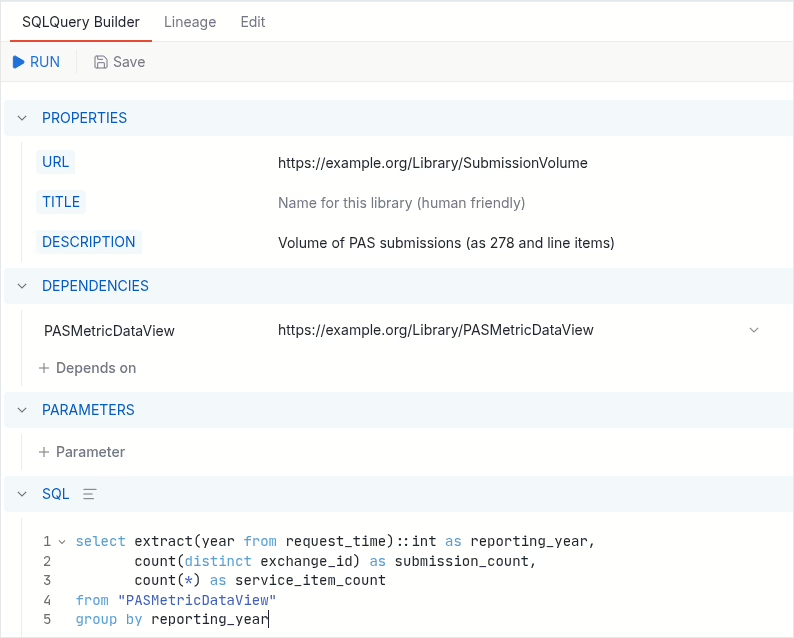
Layer 5: submission volume is an aggregate over that model, a SQLQuery. It is an adoption metric, so it counts submissions and items per reporting year, which a dashboard can filter to whichever year it needs:
-- SubmissionVolume, by reporting year
-- depends on: PASMetricDataView
select extract(year from request_time)::int as reporting_year,
       count(distinct exchange_id) as submission_count,
       count(*) as service_item_count
from "PASMetricDataView"
group by reporting_year
As a SQLQuery resource it carries a canonical URL, its depends-on (PASMetricDataView),
and the SQL. The parameters slot is empty here, but it is where a filter like a reporting
date range might plug in:
Run it, and for our two claims, both from 2026: two distinct exchanges, c1 and c2, so 2 submissions, and three item rows, so 3 service items:
| reporting_year | submission_count | service_item_count |
|---|---|---|
| 2026 | 2 | 3 |
Lineage for free
In most stacks lineage is extra work: a separate tool, or a diagram someone keeps
updating by hand. Aidbox derives it. Because each SQLView and SQLQuery names its inputs
with relatedArtifact: depends-on, the moment the artifacts load Aidbox knows the
dependency graph and draws it, from raw resource type up to the metric.
Every node runs in place, so debugging is concrete: run a single ViewDefinition, SQLView, or SQLQuery on its own, see what it returns, and trace a number on a chart back to the FHIRPath that produced it.
Here is the lineage Aidbox draws for the submission-volume metric. Claim,
Practitioner, and ClaimResponse flatten into ViewDefinitions, which feed the
ClaimWithProviderView and ResponseResultView SQLViews, then the PASMetricDataView
model, then the SubmissionVolume query:
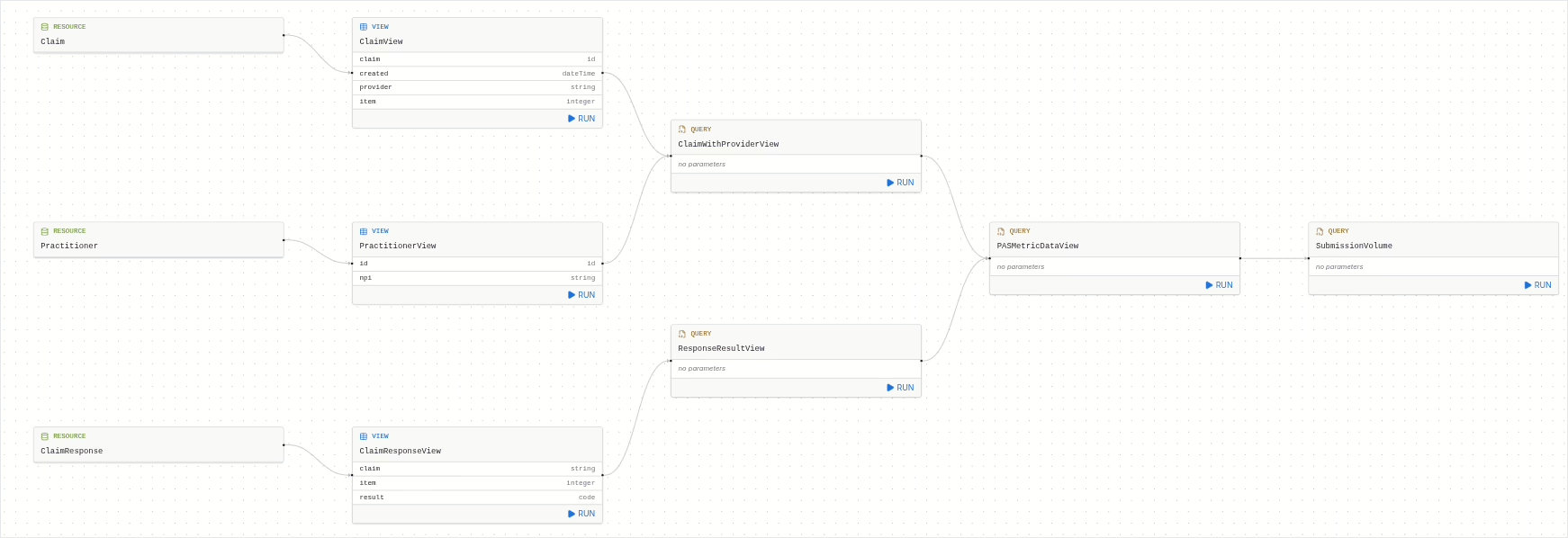
The real PAS graph is larger: the same model (PASMetricDataView) feeds the other
nine metrics, each declaring its inputs the same way.
Run it anywhere, serve any BI tool
$sqlquery-run runs a metric on the spot against live data, which is handy while you
are building one or answering an ad hoc question.
For dashboards, each metric becomes a Postgres materialized view, precomputed and refreshed in place. Metabase, Tableau, or Power BI connect to a plain table and never see the FHIR underneath. Nothing is exported and there is no warehouse to sync; the analytics sit in the same Postgres as the FHIR data.
What you end up with
The metrics end up as a handful of ordinary FHIR resources, ViewDefinitions, SQLViews, and SQLQueries, not a custom pipeline. That suits PAS, which is still moving: PASMetricData is a reference shape rather than a fixed one, and the metrics around it keep changing. When they do, you edit one artifact and the rest of the graph follows. None of this is specific to PAS either: any IG that defines metrics, or just a logical model, can be built the same way.
Because they are resources, they version, bundle into a package, and install with one
upload. In the lineage view you can run, debug, or modify any node ad hoc, and
$sqlquery-run executes whatever slice you point it at: a single view, one metric's
path back to the source, or the whole model at once.
Want to run PAS metrics on your own data? Try a view in the ViewDefinition builder, or build the full pipeline yourself in Aidbox.
Payers facing CMS-0057-F prior authorization reporting can get Da Vinci PAS support packaged and ready to run with Payerbox, Health Samurai's CMS-0057-F solution.
Talk to our team to get started.
See also:
- SQL on FHIR: Interoperable Analytics, the general pattern behind this pipeline