

8 CPU cores, one FHIR server. Give all cores to a single Aidbox instance or split them across several? We benchmarked both approaches — vertical scaling (more cores per instance) and horizontal scaling (more instances with fewer cores).
In our previous article "Game of Pools", we showed that Aidbox scales nearly linearly as you add CPU cores. But linear vertical growth is only half the story. What happens when you distribute those same cores across multiple instances?
How Aidbox Works in a Cluster
Aidbox relies heavily on caches: validation engine, routing, subscriptions, and more. With horizontal scaling, the main challenge is keeping these caches in sync across instances. The typical solution is an external service like Redis.
Aidbox takes a different approach — no external cache required. Inter-instance synchronization works through PostgreSQL LISTEN/NOTIFY mechanism: when one instance updates data, the others receive a notification and invalidate their cache. PostgreSQL, which is already required for operation, doubles as the event bus. No extra infrastructure needed.
If your instance is fully static (you don't create system resources at runtime), you can disable cache synchronization entirely. This gives a small performance boost by eliminating the LISTEN/NOTIFY overhead.
Test Setup
All tests ran on a single machine. Aidbox instances sit behind nginx (least_conn). Database: a single PostgreSQL 18 instance. Load generated by k6 (5 minutes, CRUD scenario across 9 FHIR resource types). Before each run: 30-second warmup + 60-second cooldown. VU count scales proportionally to CPU cores (37 VUs per core, 300 VUs for 8 cores) to keep latency comparable across configurations.
Vertical Scaling: One Instance on 1, 2, 4, 8 Cores
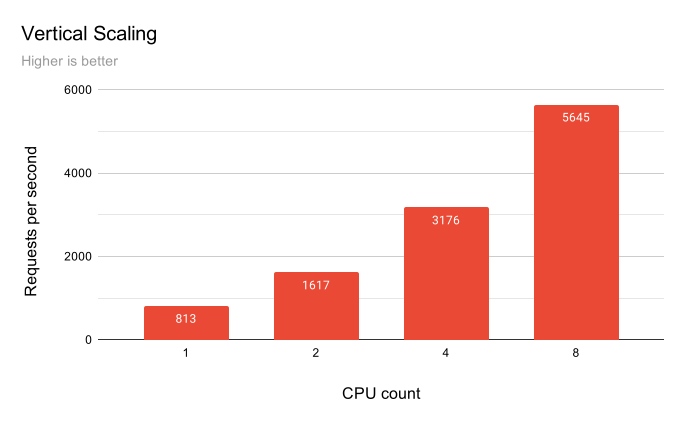
Before splitting cores across instances, let's establish a baseline — how Aidbox scales vertically when all cores go to a single instance:
| CPUs | VUs | RPS | P95 ms | Multiplier |
|---|---|---|---|---|
| 1 | 37 | 813 | 88.1 | 1.0 X |
| 2 | 75 | 1617 | 76.3 | 2.0 X |
| 4 | 150 | 3176 | 73.3 | 3.9 X |
| 8 | 300 | 5645 | 78.3 | 7.0 X |
Doubling CPU doubles RPS. Latency stays stable (avg 70–90 ms) because load grows proportionally to capacity. At 8 cores the multiplier is 7.0× instead of an ideal 8× — losses due to contention for shared resources (memory, GC, PostgreSQL, network). A solid result: Aidbox vertical scaling is predictable and efficient.
Horizontal Scaling: Splitting 8 Cores Across Instances
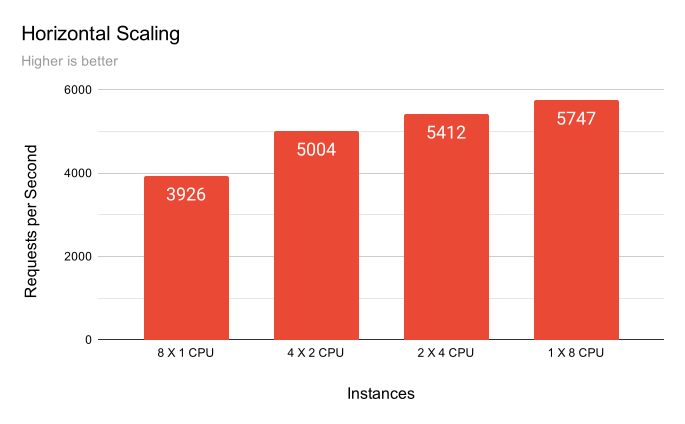
The key experiment. Take the same 8 cores and distribute them differently:
| Instances | CPUs | RPS | Avg ms | P95 ms | P99 ms |
|---|---|---|---|---|---|
| 8 | 1 | 3926 | 76.1 | 125.7 | 197.3 |
| 4 | 2 | 5004 | 59.7 | 80.5 | 98.5 |
| 2 | 4 | 5412 | 55.2 | 73.9 | 80.5 |
| 1 | 8 | 5747 | 52.0 | 75.9 | 87.4 |
Horizontal Scaling Efficiency
Degradation is gradual up to 4×2 and sharp at 8×1:
- 1×8 → 2×4: −5.8% (5747 → 5412)
- 2×4 → 4×2: −7.5% (5412 → 5004)
- 4×2 → 8×1: −21.5% (5004 → 3926)
- 1×8 → 8×1: −31.7% overall
The "Efficiency" column shows what fraction of the theoretical maximum (8 × 813 = 6,500 RPS) each configuration achieves and sorted by efficiency:
| Strategy | Config | RPS | P99 ms | Efficiency |
|---|---|---|---|---|
| Horizontal | 1×8 CPU | 5747 | 87.4 | 88.4% |
| Horizontal | 2×4 CPU | 5412 | 80.5 | 83.2% |
| Horizontal | 4×2 CPU | 5004 | 98.5 | 76.9% |
| Horizontal | 8×1 CPU | 3926 | 197.3 | 60.4% |
Memory Usage
Horizontal scaling has a hidden cost: each JVM instance carries its own memory overhead. Eight single-core instances consume significantly more RAM than one eight-core instance. With rising hardware prices (thanks to the AI hype), this can noticeably increase the cost of running Aidbox.
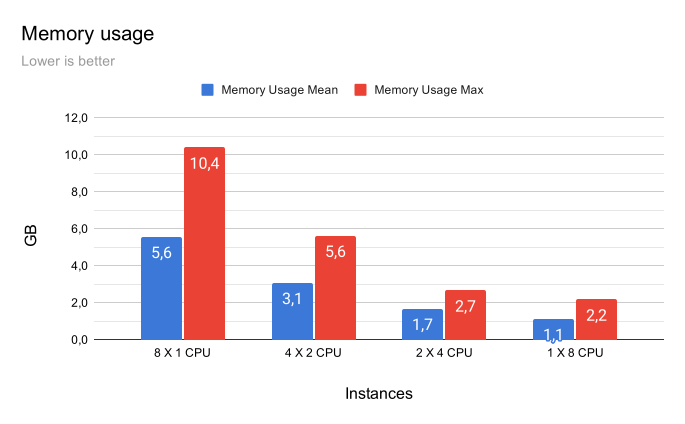
| Config | Mean (GB) | Max (GB) |
|---|---|---|
| 8×1 CPU | 5.5 | 10.4 |
| 4×2 CPU | 3.0 | 5.6 |
| 2×4 CPU | 1.6 | 2.6 |
| 1×8 CPU | 1.1 | 2.1 |
- Going from 1×8 to 2×4 adds only +0.5 GB on average, but 8×1 requires roughly 5× more memory by both mean and peak
- Practical takeaway: 2×4 is often the sweet spot between fault tolerance and RAM budget, while 8×1 only makes sense under very specific isolation requirements
Key Takeaways
- Vertical scaling wins on raw RPS. A single instance on 8 cores squeezes the most out of the hardware. Horizontal splitting always costs overhead.
- Horizontal scaling pays off when you need fault tolerance. 2×4 loses only 6% RPS compared to 1×8, but gives you redundancy and the best P99 (80.5 ms vs 87–90 ms). If one instance goes down, the other keeps serving requests.
- The inflection point is 2 CPUs per instance. Configurations with 2+ CPUs (2×4, 4×2) maintain 79–85% efficiency. Below 2 CPUs, JVM overhead becomes critical — 8×1 loses ~40% efficiency and shows the worst P99 of all configurations.
- The cost of isolation. Total RPS of a horizontal configuration is always lower than vertical on the same core count. Each JVM carries its own overhead: cache startup, GC, network, baseline memory consumption. The smaller the instances, the larger the overhead share in the total resource budget.
Our recommendation: don't over-split. If you have 8 cores, the 2×4 configuration is the sweet spot — you get high availability with minimal trade-offs: minimal performance loss and minimal memory overhead. Going smaller than 2 CPUs per instance isn't worth it — the JVM overhead eats into your performance budget fast.
What's Next
In the next article, we'll move beyond the test bench and see how Aidbox behaves in a near-production environment. We'll also calculate the real cost of running Aidbox in the cloud.
See also: Health Samurai Lab: Game of Pools.