


Like most web applications, Aidbox consists of an incoming web request queue, a pool of web workers that process requests, and a pool of database connections. These two pools - web workers and database (db) connections - play a major role in Aidbox performance. Together, they determine how efficiently server resources are utilized.
Aidbox allows you to configure the sizes of these pools through the
BOX_WEB_THREAD
and
BOX_DB_POOL_MAXIMUM_POOL_SIZE
settings. This raises the question: what are the optimal parameters to specify for my particular installation?
Common sense suggests that the number of web threads should scale with available CPU cores on your server, while the
database connection pool size should be large enough to serve all active web workers plus a small reserve for background tasks.
Based on this, the recommendation from Health Samurai was
BOX_WEB_THREAD = 2 × CPU_COUNT
and
BOX_DB_POOL_MAXIMUM_POOL_SIZE = 2 × BOX_WEB_THREAD.
This recommendation is generally logical and aligns with the understanding of how the web stack works. It was confirmed by our experience in maintaining Aidbox.
However, until now it had not been validated through systematic load testing under sustained load.
Test environment
To isolate Aidbox performance, we ran all tests locally on a dedicated server, using a local database and local network with fast NVMe disks to minimize network and IO overhead. We used the K6 utility to run the tests.
The tests performed CRUD operations across nine different resource types. As a result, we measured throughput and latency.
The full test environment, scripts, and results are available in the repository.
Test scenarios
Now a few words about how we tested Aidbox. Since we wanted to test different CPU limit configurations (2, 4, 6, 8), it would be inconvenient to define pool sizes in advance for each CPU limit. Instead, we will use multipliers:
CPU_LIMITS = [2, 4, 6, 8]
WEB_THREAD_MULTIPLIERS = [1, 1.5, 2, 2.5, 3]
DB_POOL_MULTIPLIERS = [1.5, 2, 2.5, 3]
What does this mean? During testing, we iterated through all possible combinations of these parameters. For example, for 6 CPU cores with a web multiplier of 2 and a database multiplier of 2.5, this results in the following configuration:
services:
  aidbox:
    deploy:
      resources:
        limits:
          cpus: '6'                            # 6 CPU limit
    environment:
      BOX_INSTANCE_NAME: cpu_6__web_12__db_30
      BOX_WEB_THREAD: '12'                     # 6 * 2 (web multiplier)
      BOX_DB_POOL_MAXIMUM_POOL_SIZE: '30'      # 6 * 2 * 2.5 (web and db multiplier)
In total, we executed 80 tests of all possible configurations. Before each test, we performed a warm-up, followed by a 5-minute stress test on CRUD operations.
A very important observation from testing is that the database pool size larger than the number of web workers, because during operation Aidbox takes several connections for background tasks, which can lead to errors when attempting to obtain a database connection while processing a request.
Test results
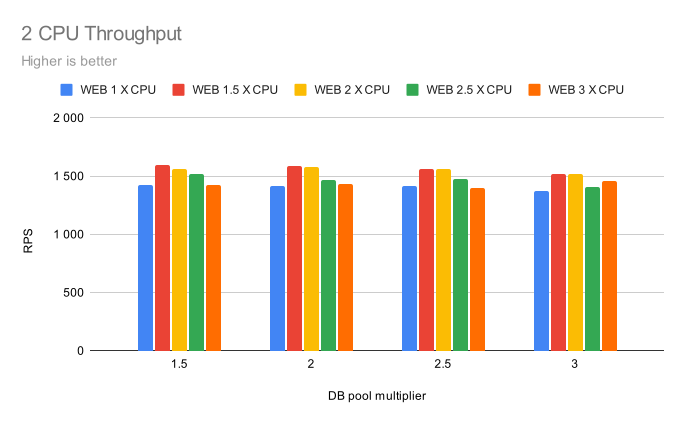
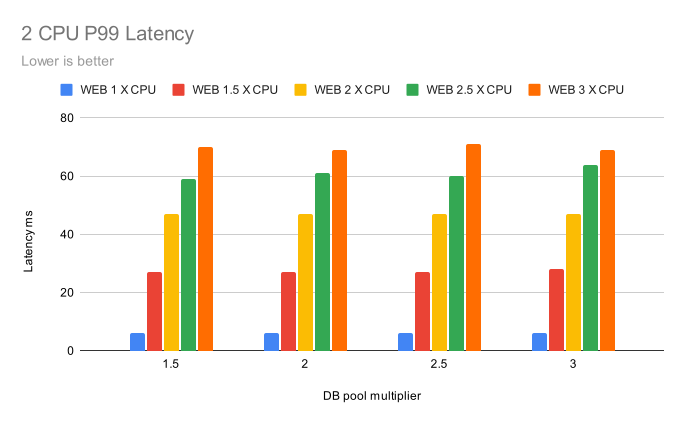
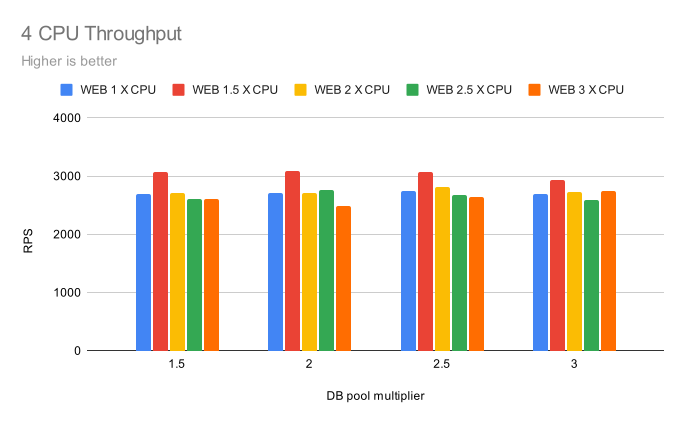
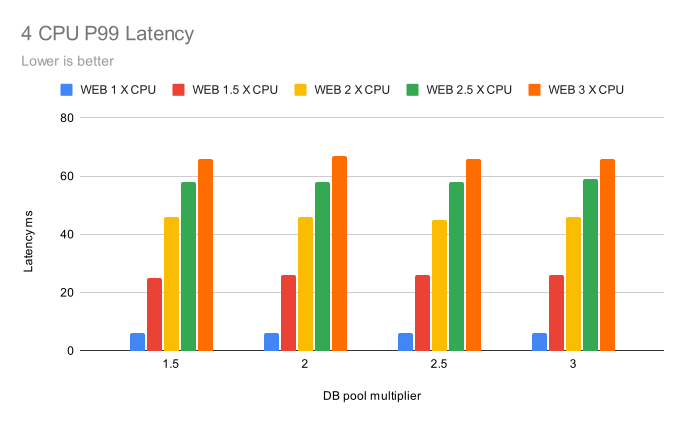
After almost eight hours of testing, we can look at the results. Below are the detailed performance analysis charts for each CPU configuration:
2 CPU Configuration
4 CPU Configuration
6 CPU Configuration
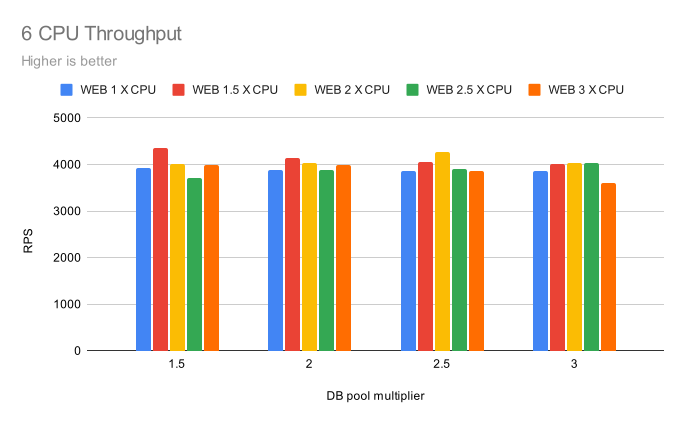
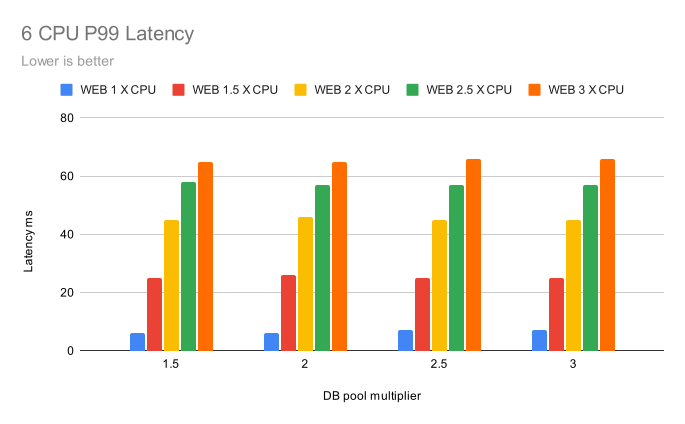
8 CPU Configuration
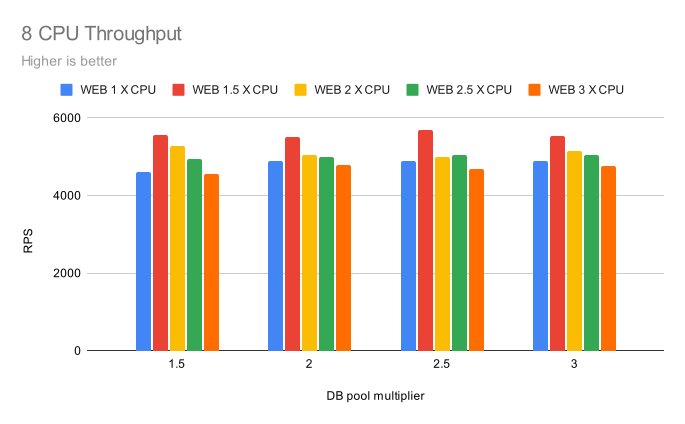
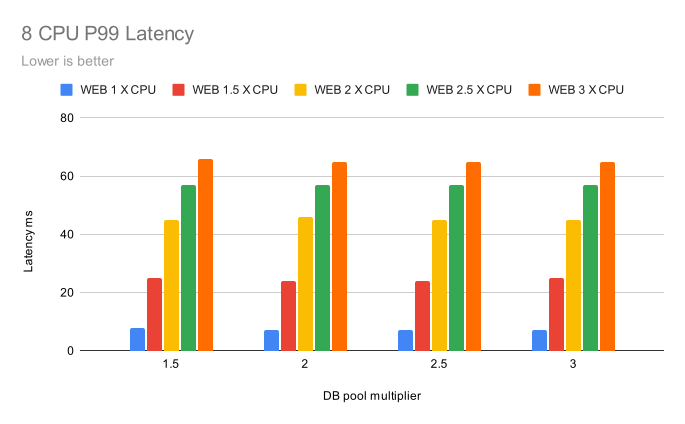
Key Observations from Charts
The charts clearly demonstrate:
- Throughput (RPS): Maximum throughput is achieved with a web thread multiplier = 1.5x and db pool multiplier = 2-2.5x
- P99 Latency: Minimum latency is observed with web thread multiplier = 1x and db pool multiplier = 1.5-2x
- Scaling: Nearly linear performance scaling with increasing number of CPU cores
- Trade-offs: Clear inverse relationship between throughput and latency when increasing WEB threads size
Summary
The test results show that our previous recommendations and general understanding of how Aidbox behaves under load. We just received practical confirmation in numbers.
To summarize, the general recommendation for
BOX_DB_POOL_MAXIMUM_POOL_SIZE
is
2 × BOX_WEB_THREAD.
Increasing the database pool size does not provide any performance gain, and in some cases leads to its degradation.
This degradation is not significant and is within the margin of measurement error, but it was still traceable.
On our detailed dashboards, with an increased db pool size, we observed more frequent GC activity,
which may indicate additional overhead for managing a large database connection pool.
The general recommendation for
BOX_WEB_THREAD
is
1.5 × CPU_COUNT.
This provides the best balance between throughput and latency and is perfect for most projects.
For projects like EHR, PHR, Patient portal and similar, where there are many short and fast OLTP operations,
where system responsiveness and minimal latency are more important for better end-user experience,
it's better to set
BOX_WEB_THREAD
to
1 × CPU_COUNT.
For CDR-type systems where there are many long and complex search and analytical queries,
many bulk imports, and most of the work falls on the database,
it's better to set
BOX_WEB_THREAD
to
2 × CPU_COUNT.
Below is a summary table with recommended parameters:
| CPU Count | Use Case | WEB threads | DB pool size |
|---|---|---|---|
| 2 | Balanced (Recommended) | 3 | 6 |
| 2 | Low Latency | 2 | 4 |
| 2 | High Throughput | 4 | 8 |
| 4 | Balanced (Recommended) | 6 | 12 |
| 4 | Low Latency | 4 | 8 |
| 4 | High Throughput | 8 | 16 |
| 6 | Balanced (Recommended) | 9 | 18 |
| 6 | Low Latency | 6 | 12 |
| 6 | High Throughput | 12 | 24 |
| 8 | Balanced (Recommended) | 12 | 24 |
| 8 | Low Latency | 8 | 16 |
| 8 | High Throughput | 16 | 32 |
These are general recommended parameters based on synthetic tests and do not take into account various aspects of the entire system's operation, such as imports, database maintenance, etc. In any case, to select optimal parameters specifically for your system, it's better to conduct similar tests in your own environment. You can use these numbers as a baseline from which to start fine-tuning your system. If you need help tuning Aidbox for your workload or infrastructure, get in touch with us.
An interesting observation we found today is the nearly linear performance scaling with increasing number of CPU cores. Well, we'll be testing that next blog post.
Marat Surmashev, VP of Engineering
See also: Getting FHIR ready for production.