


Introduction
Digital questionnaires are widely used in healthcare to collect structured data. They control what is asked and keep answers consistent.
The problem begins after submission. A QuestionnaireResponse stores answers in a nested, form-specific structure. While ideal for capture, this structure is not optimized for querying, interoperability, or analytics.
Data extraction solves this problem. It enables several critical capabilities: interoperability between different healthcare systems, data analytics, and real-time data integration. Data from multiple sources can be consolidated without getting stuck in a single system or in QR code formats that limit processing.
FHIR recommends using Questionnaires to capture raw data, then converting the QuestionnaireResponse into standard FHIR resources such as Observations or MedicationStatements. Once transformed, the data can be searched, shared, and used across systems.
The Challenge of Data Extraction
FHIR Questionnaires excel at structured data capture. However, the final QuestionnaireResponse instances that are hard to search, compare, or integrate with other FHIR resources. The core challenge is converting these responses into standard FHIR resources (e.g., Observations, Patient, Condition) for seamless use in documents, messages, or REST APIs.
The SDC guide provides four extraction mechanisms, each tailored to specific use cases in complexity, control, and scalability. In this article, we will only talk about three of them and omit StructureMap-based extraction. You can read more about it here.
Observation-Based Extraction
Best for: Simple clinical assessments or surveys mapping directly to individual Observations.
- Use when questions align 1:1 with coded values (e.g., LOINC/SNOMED) and answers (e.g., PHQ-9, vital signs like weight or blood pressure).
- Fast and lightweight — no custom mapping required.
- Limitation: Generates only Observations; unsuitable for complex or multi-resource outputs.
Definition-Based Extraction
Best for: Structured forms designed to mirror FHIR profiles or core resources.
- Ideal when questionnaire layout reflects target resource structure (e.g., patient demographics → Patient, medication list → MedicationStatement).
- Automatically handles repeating groups, backbone elements, slicing, and profile constraints (fixed values, mandatory fields).
- Limitations: form structure is tightly coupled with resource structure
Template-Based Extraction
Best for: Forms producing multiple linked resources
Template-based extraction is the newest mechanism added to the SDC specification (after Observation-based, Definition-based, and StructureMap-based). It uses contained FHIR resource or Bundle templates annotated with FHIRPath expressions.
It was introduced specifically to overcome the complexity and governance challenges that implementers frequently encountered with the earlier methods, and it is quickly becoming the preferred choice in many projects.
- Supports loops and conditionals via FHIRPath (e.g., include identifier only if answered; repeat name components).
- Full control over boilerplate and static content
- Highest readability and lowest technical barrier
- Uses contained resource templates — independent of external profiles.
What Template-Based Extraction in SDC is
Template-based extraction is one of the four mechanisms in the FHIR SDC specification for transforming a completed QuestionnaireResponse into one or more FHIR resources or a full transaction Bundle.
It provides a balanced approach:
- More expressive than the Observation-based extraction
- Much easier to author and understand than the StructureMap-based extraction
- More explicit and visual than the Definition-based extraction
Teams choose it when they need clear control over the output and need moderate logic such as repeating groups, conditionals, fixed values, profiles, without learning the FHIR mapping language.
Core Idea
You embed ready-made template resources (or a template Bundle) directly inside the Questionnaire as contained resources. These templates already contain the required boilerplate — meta profiles, fixed codes, extensions, narrative, etc.
You then annotate parts of these templates with small FHIRPath expressions that define how data is populated:
- Fill a field using the answer to specific question
- Repeat a section once for each answer the user gave
- Remove an element if the user left the question blank
When the $extract operation runs, the engine copies the templates, evaluates the expressions against the QuestionnaireResponse, repeats or removes elements as instructed, and returns a ready-to-submit transaction Bundle.
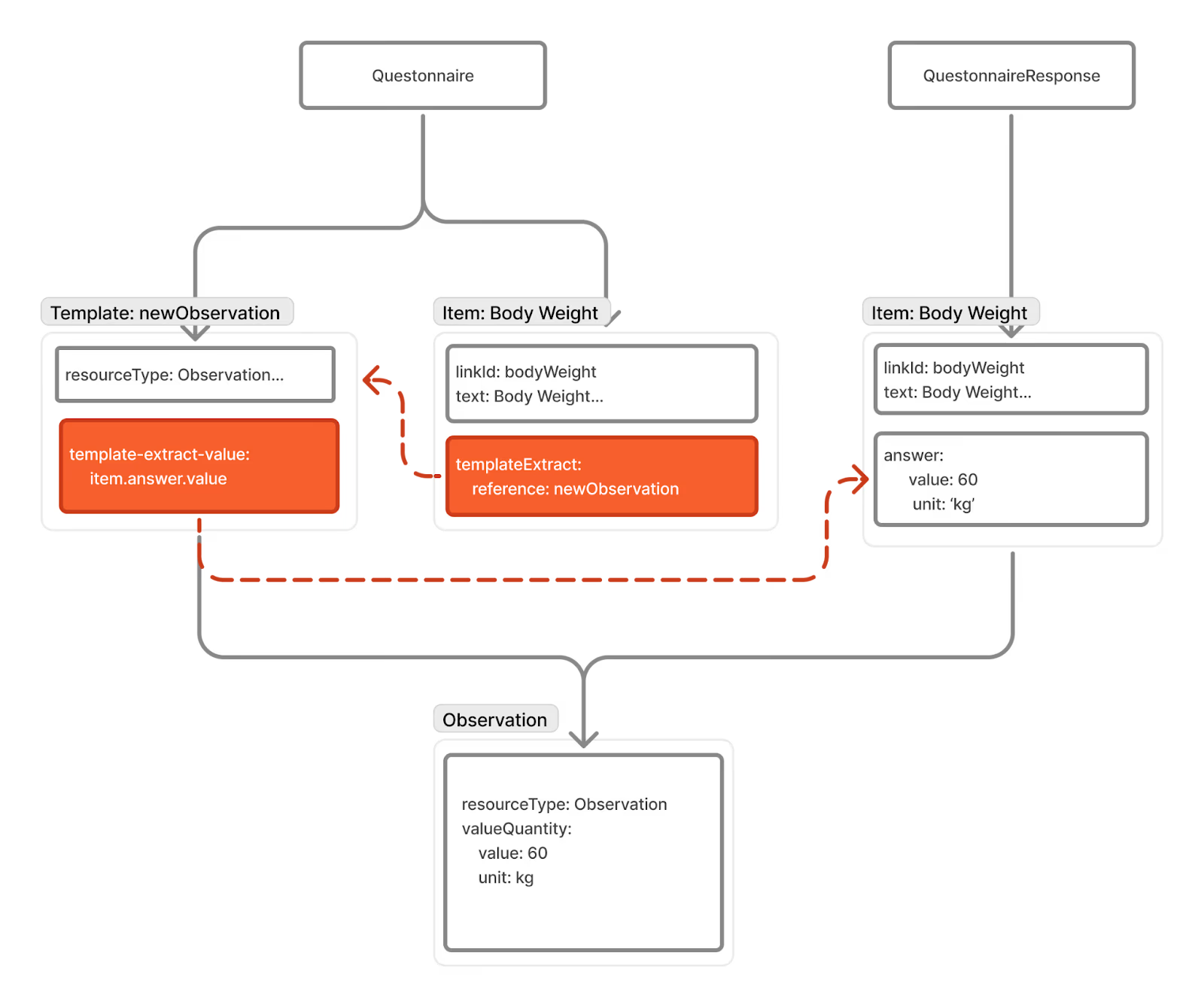
How It Works in Practice
In Aidbox Form Builder, the process is visual: you simply draw your form, then drop ready-made resource templates into the exact groups where the data lives. Aidbox automatically repeats the templates, resolves references, applies profiles, and returns a perfect transaction Bundle.
Let’s build a complete allergy intake form that extracts:
- Patient
- One AllergyIntolerance per allergy linked to that patient
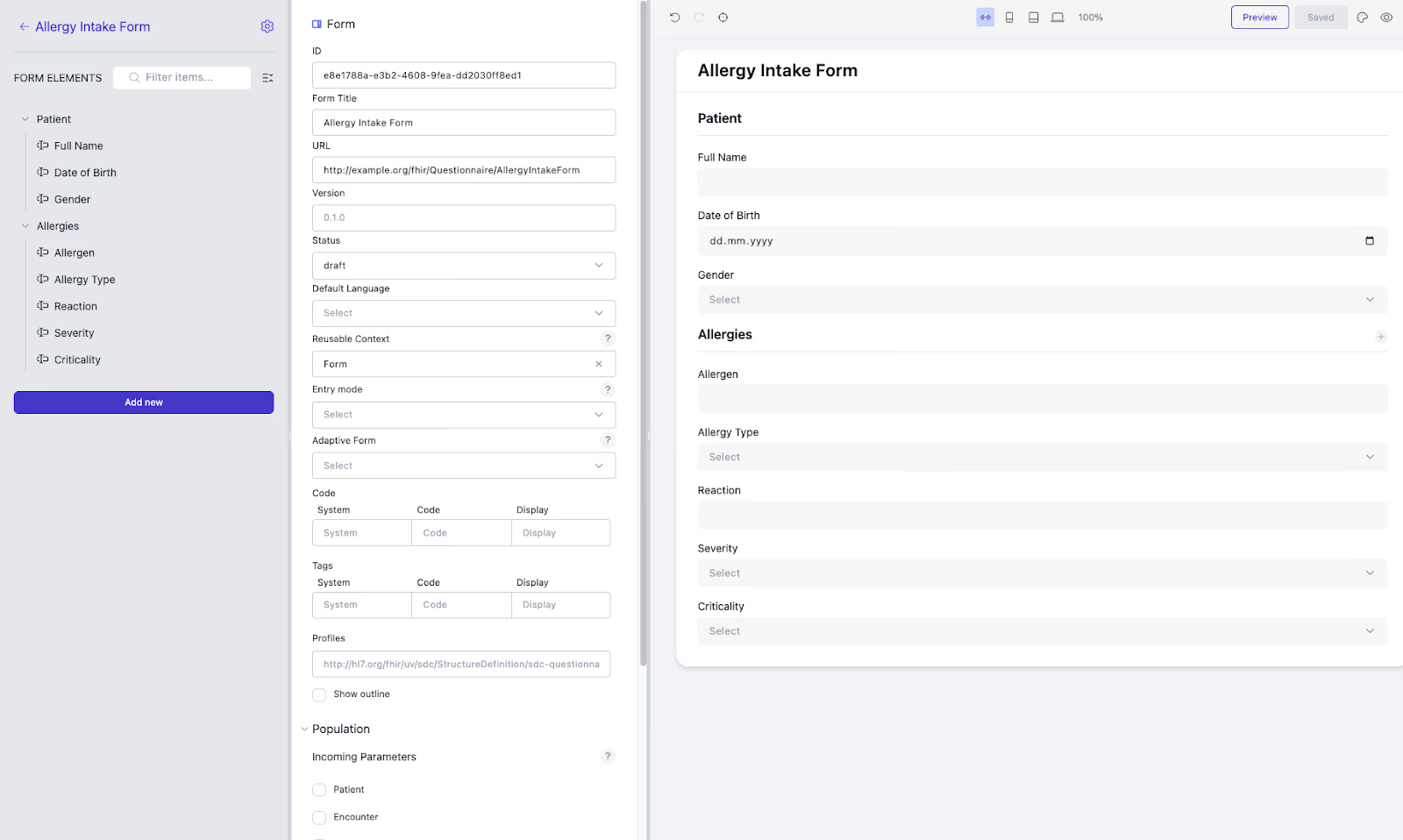
Step 1 – Build the user-facing Questionnaire (Allergy History)
Aidbox Form Builder → New Questionnaire → Title: “Allergy History”
Exact form outline (what clinicians see):
-
Patient Header Full name
-
Date of birth
-
Gender
-
Allergies Allergen
-
Allergy type
-
Reaction
-
Severity
-
Criticality
Step 2 – Define extraction templates inside Patient group
Add a Patient resource template as a contained resource.
Step 3 – Fill the templates with values
Map form fields to Patient elements using FHIRPath expressions.
Step 4 – Add the template for AllergyIntolerance extraction
Add an AllergyIntolerance resource template inside the repeating Allergies group so that one resource is created per recorded allergy.
Step 5 – Fill the template with values and link to the Patient
You can also populate fields in template with static values, for example by selecting an option from ValueSet when it remains constant across resources.
Step 6 – Test extraction
Everything is automatically linked, profiled, and ready to POST.
Conclusion
Template-based extraction provides a practical balance between flexibility, readability, and maintainability within the FHIR SDC specification. It is especially useful when full StructureMap expertise is not available or when authors need direct control over the structure of the resulting FHIR resources.
By embedding resource or Bundle templates directly within the Questionnaire (as contained resources) and annotating them with simple FHIRPath-driven templateExtractContext and templateExtractValue extensions, authors can precisely define:
- which elements appear only when relevant answers are provided,
- how repeating items generate multiple backbone elements or entire resources,
- default or fixed values, profile conformance details, and bundle-level metadata,
- conditional inclusion/exclusion logic and looping behavior — all without writing a single line of mapping script.
This method provides visual clarity and immediate testability while still supporting complex transformations, including multiple resources, cross-resource references via allocateId, conditional sections, and full transaction Bundles. Because the output structure is explicitly defined in the template, implementers can validate the expected results at design time, dramatically reducing runtime errors compared with the more procedural alternatives.
For teams that want robust, reusable, profile-conformant resource creation from forms but want to avoid the learning curve of StructureMap or the rigidity of purely definition-based mapping, template-based extraction stands out as the most approachable high-capability option in the SDC toolbox.
See also: SQL on FHIR: What is a ViewDefinition?.