

Healthcare organizations often manage complex hierarchical structures — regional hospital networks comprising diverse facilities that must balance shared resources with organizational autonomy. Additionally, many clinic-specific healthcare systems need event-driven architecture for real-time data synchronization across interconnected entities. Aidbox solves these challenges with two powerful features: Organization-Based Hierarchical Access Control (OrgBAC) and Topic-Based Subscriptions.
OrgBAC: Hierarchical Data Isolation
OrgBAC allows you to represent an organizational hierarchy inside Aidbox FHIR server and provides FHIR API endpoints with automatic data isolation.
Imagine a healthcare network such as:
- MedCorp HQ (parent organization with full access to all data across the network)City General Hospital (branch with limited access restricted to their own organizational data)
- Riverside Clinic (branch with limited access restricted to their own organizational data)
To illustrate this, the bundle below shows how each organization in the hierarchy is created through the REST API:
POST /fhir

resourceType: Bundle
type: batch
entry:
- request:
    method: PUT
    url: Organization/med-corp
  resource:
    name: MedCorp HQ
    resourceType: Organization
- request:
    method: PUT
    url: Organization/city-general-hospital
  resource:
    name: City General Hospital
    resourceType: Organization
    partOf:
      reference: Organization/med-corp
- request:
    method: PUT
    url: Organization/riverside-clinic
  resource:
    name: Riverside Clinic
    resourceType: Organization
    partOf:
      reference: Organization/med-corp
Each gets a dedicated endpoint:
/Organization/med-corp/fhirfor MedCorp HQ/Organization/city-general-hospital/fhirfor City General Hospital/Organization/riverside-clinic/fhirfor Riverside Clinic
Any resource created through an organization’s endpoint is automatically tagged with its organization ID, ensuring proper isolation without any additional configuration:
PUT /Organization/city-general-hospital/fhir/Patient/pt-123

name: [ { family: 'John' } ]

---

meta:
  extension:
    - url: https://aidbox.app/tenant-organization-id
      valueReference:
        reference: Organization/city-general-hospital
id: pt-123
resourceType: Patient
name:
  - family: Smith
The underlying access logic is simple and predictable:
- MedCorp HQ sees everything from all branches (
GET /Organization/med-corp/fhir/Patient) - City General sees only its own data (
GET /Organization/city-general-hospital/fhir/Patient) - Riverside sees only its own data (
GET /Organization/riverside-clinic/fhir/Patient)
For more details about OrgBAC features and configuration, see the documentation: Organization-Based Hierarchical Access Control (OrgBAC)
Topic-Based Subscriptions: Real-Time Events
Subscriptions enable real-time data synchronization through webhooks, Kafka, and various message queues. Beginning with Aidbox 2509, subscriptions automatically respect organizational boundaries. When subscription is created through an organization's API, it inherits hierarchical filtering rules.
This ensures:
- Hierarchical Flow: MedCorp HQ's subscription captures events from all branches
- Scoped Topics: City General's and Riverside's subscriptions only receive their own events
- Security: Events never leak between sibling organizations
Two key components are required for setup:
- AidboxSubscriptionTopic - defines what types of events should trigger notifivations. The example below captures every final Observation across the entire MedCorp network:
POST /Organization/med-corp/fhir/AidboxSubscriptionTopic

{
  "resourceType": "AidboxSubscriptionTopic",
  "url": "http://aidbox.example/observation-feed",
  "status": "active",
  "trigger": [{
    "resource": "Observation",
    "fhirPathCriteria": "status = 'final'"
  }]
}
AidboxTopicDestination – specifies where to send notifications. Each organization has its own destination created through its dedicated endpoint. The following bundle demonstrates how these destinations are created through the REST Console.
POST /

resourceType: Bundle
type: batch
entry:
# MedCorp HQ destination - receives events from entire network
- request:
    method: POST
    url: /Organization/med-corp/fhir/AidboxTopicDestination
resource:
    id: med-corp-observation-feed
    resourceType: AidboxTopicDestination
    meta:
    profile: ["http://aidbox.app/StructureDefinition/aidboxtopicdestination-webhook-at-least-once"]
    kind: webhook-at-least-once
    topic: http://aidbox.example/observation-feed
    parameter:
    - name: endpoint
    valueUrl: https://med-corp-hq.requestcatcher.com/test

# City General Hospital destination - receives only its events
- request:
    method: POST
    url: /Organization/city-general-hospital/fhir/AidboxTopicDestination
resource:
    id: city-general-observation-feed
    resourceType: AidboxTopicDestination
    meta:
    profile: ["http://aidbox.app/StructureDefinition/aidboxtopicdestination-webhook-at-least-once"]
    kind: webhook-at-least-once
    topic: http://aidbox.example/observation-feed
    parameter:
    - name: endpoint
    valueUrl: https://city-general-hospital.requestcatcher.com/test

# Riverside Clinic destination - receives only its events
- request:
    method: POST
    url: /Organization/riverside-clinic/fhir/AidboxTopicDestination
resource:
    id: riverside-observation-feed
    resourceType: AidboxTopicDestination
    meta:
    profile: ["http://aidbox.app/StructureDefinition/aidboxtopicdestination-webhook-at-least-once"]
    kind: webhook-at-least-once
    topic: http://aidbox.example/observation-feed
    parameter:
    - name: endpoint
    valueUrl: https://riverside-clinic.requestcatcher.com/test
You can monitor requests received by each organization using the following URLs (open them before producing events):
- https://med-corp-hq.requestcatcher.com
- https://riverside-clinic.requestcatcher.com
- https://city-general-hospital.requestcatcher.com
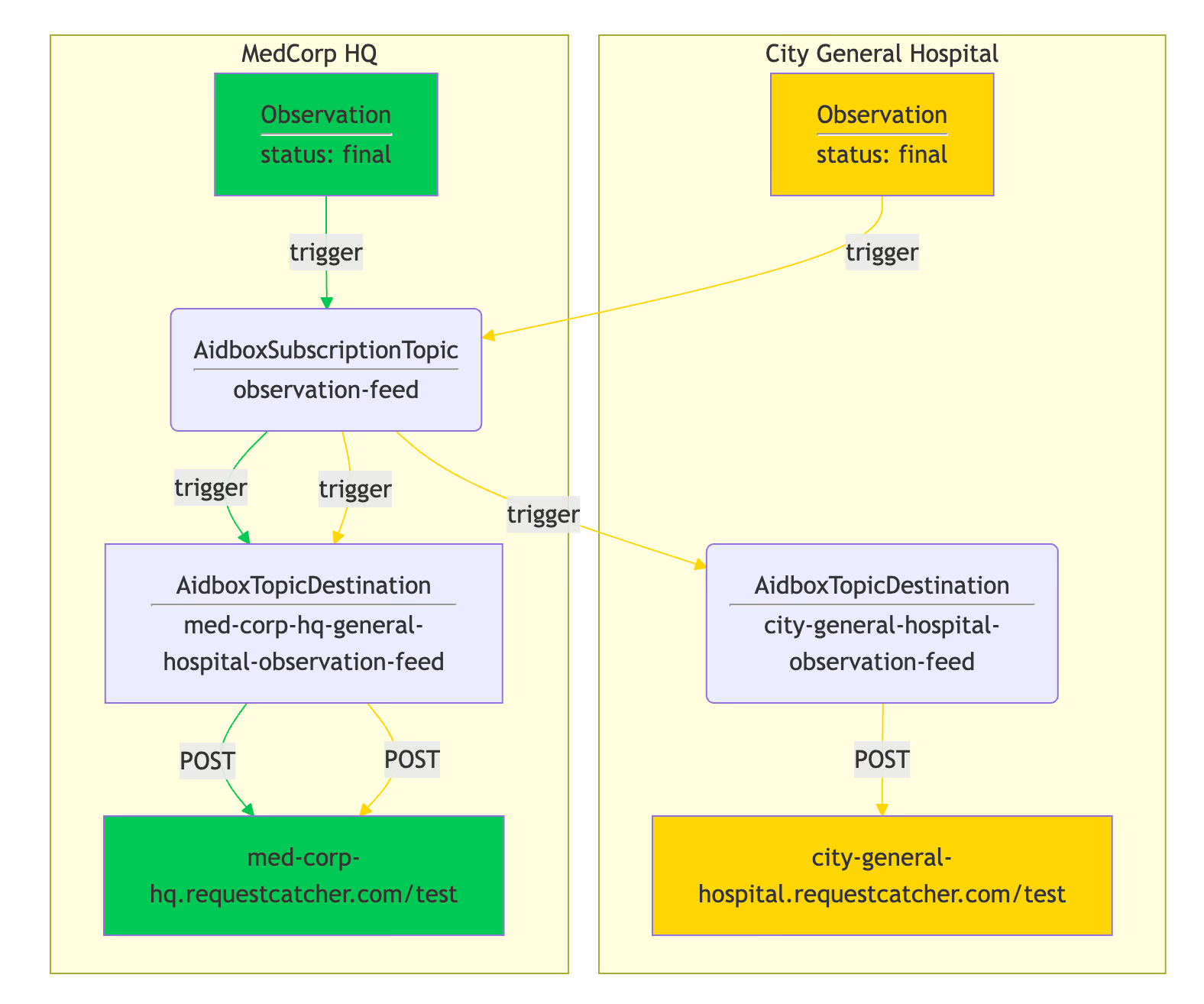
The diagram below illustrates how event flows through the system. Green arrows show MedCorp HQ event flow, while yellow arrows show City General Hospital event flow:
Test it yourself via REST Console
- Create a patient:
POST /Organization/city-general-hospital/fhir/Patient

id: pt-1
name: [{"family": "Smith"}]
Create an observation:
POST /Organization/city-general-hospital/fhir/Observation

resourceType: Observation
status: final
code:
  coding:
  - system: http://loinc.org
    code: 15074-8
    display: Glucose [Moles/volume] in Blood
subject:
  reference: Patient/pt-1
valueQuantity:
  value: 6.3
  unit: mmol/l
  system: http://unitsofmeasure.org
  code: mmol/L
Check that http://med-corp-hq.requestcatcher.com and https://city-general-hospital.requestcatcher.com should receive observation create events.
Conclusion
OrgBAC and topic-based subscriptions together create a robust foundation for multi-tenant healthcare architectures. This combination delivers immediate value:
- Hierarchical oversight: Parent organizations monitor all branches while each facility maintains data autonomy
- Zero-configuration isolation: Data boundaries are enforced automatically - no manual access control needed
- Real-time synchronization: Critical events flow instantly to dashboards, billing, and quality systems
- Built-in security: Organizational boundaries prevent data leakage between sibling facilities
- Developer efficiency: Native FHIR compliance without custom middleware or complex infrastructure
Whether you're architecting a regional hospital network, managing multiple clinics, or building a multi-practice EHR, Aidbox provides a secure, scalable foundation your healthcare system needs.
Start using a free developer license to implement OrgBAC and topic-based subscriptions in your organization, or explore the documentation for detailed implementation guides.
See also: RBAC with Keycloak and SMART on FHIR V2.