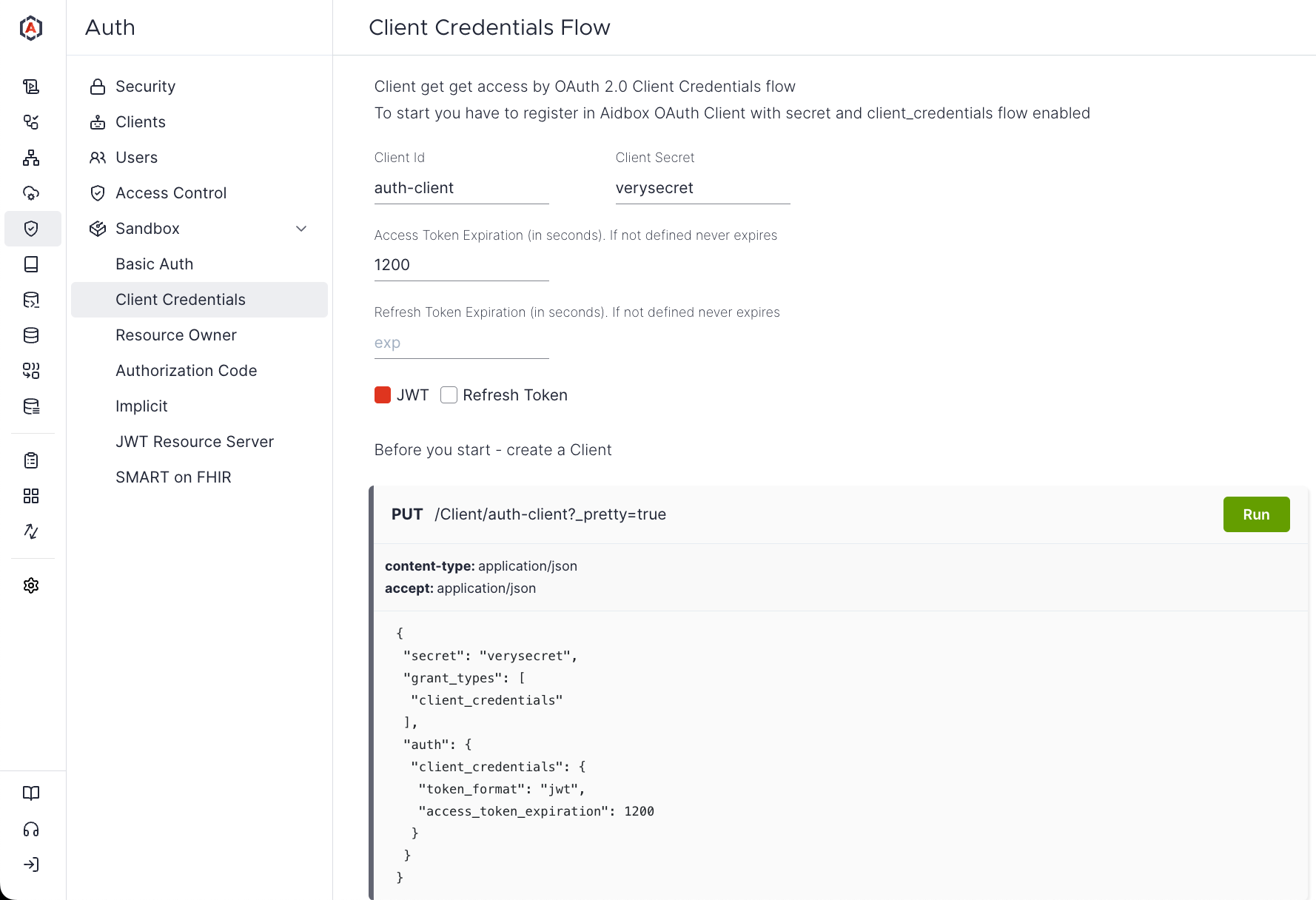
--- description: >- Aidbox supports machine to machine (m2m) authentication via client credentials oAuth 2.0 flow --- # How to configure Client Credentials Grant The Client Credentials grant is used when applications request an access token to access their own resources, not on behalf of a user (for example, background services and daemons). It must be used only by confidential clients. ![Basic scheme](<../../.gitbook/assets/f1f7a1f5-30e2-46e6-a7e2-e6e4a8fd4efd (1).svg>) Aidbox OAuth module supports Client Credentials Grant flow in different formats. The first one is in strict adherence to [specification](https://tools.ietf.org/html/rfc6749#section-4.4.2) for better compatibility. The second one uses JSON request as a more modern and simple way. Read the official [OAuth 2.0 specification](https://tools.ietf.org/html/rfc6749#section-4.4) for more details. ### Easy way The easiest way to test Client Credentials Grant flow is to run through the [Aidbox Sandbox UI](client-credentials-grant.md#auth-sandbox) (_Auth -> Sandbox -> Client Credentials_).
Sandbox UI for Client Credentials Grant testing

Sandbox UI

### Configure Client To start using this flow you have to create and configure Client. The only required parameters is `secret` and you also have to enable this flow for client by `grant_types: ['client_credentials']`
PUT /Client/api-client
Accept: text/yaml
Content-Type: text/yaml

secret: verysecret
grant_types:
  - client_credentials
You can also configure token's format and expiration, as well refresh the token: | attribute | options | desc | | --------------------------------------------------------- | ------------- | ------------------------------------------------------- | | _auth.client\_credentials_**.token\_format** | jwt | use access token in jwt format | | _auth.client\_credentials._**access\_token\_expiration** | int (seconds) | token expiration time from issued at | | _auth.client\_credentials_**.refresh\_token** | true/false | enable refresh\_token | | _auth.client\_credentials_**.refresh\_token\_expiration** | int (seconds) | refresh token expiration time from issued or last usage | ```yaml PUT /fhir/Client/api-client Accept: text/yaml Content-Type: text/yaml secret: verysecret grant_types: - client_credentials auth: client_credentials: access_token_expiration: 600 # 10 minutes token_format: jwt refresh_token: true refresh_token_expiration: 86400 # 1 day ``` Since by default new client has no access to any resources, you probably want to configure AccessPolicy for this specific client: ```yaml PUT /fhir/AccessPolicy/api-client Accept: text/yaml Content-Type: text/yaml engine: allow link: - id: api-client resourceType: Client ``` ### Get Access Token The next step is to exchange client id and secret for Access Token. Using Authorization header `{base64(Client.id + ':' + Client.secret)}` or by JSON request with `client_id` and `client_secret` in body: {% tabs %} {% tab title="Request with Authorization header " %} ```yaml POST /fhir/auth/token Authorization: Basic YXBpLWNsaWVudDp2ZXJ5c2VjcmV0 Content-Type: application/x-www-form-urlencoded grant_type=client_credentials ``` {% endtab %} {% tab title="Request with credentials in body" %} ```yaml POST /fhir/auth/token Content-Type: application/json { "grant_type": "client_credentials", "client_id": "api-client", "client_secret": "verysecret" } ``` {% endtab %} {% endtabs %} {% tabs %} {% tab title="Response with simple client" %} For simple client configuration you will get JSON with access\_token in response:
status: 200

{
 "token_type": "Bearer",
 "access_token": "ZjQyNGFhY2EtNTY2MS00NjVjLWEzYmEtMjIwYjFkNDI5Yjhi"
} 
{% endtab %} {% tab title="Response with JWT" %} For JWT with refresh token you will get something like this: ```yaml status: 200 { "token_type": "Bearer", "expires_in": 3000, "access_token": "eyJhbGciOiJSUzI1NiIsInR5cCI6IkpXVCJ9.eyJpc3MiOiJodHRwOi8vbG9jYWxob3N0OjgwODEiLCJzdWIiOiJhdXRoLWNsaWVudCIsImlhdCI6MTU1NDQ3MDA3NCwianRpIjoiOWJlMTY1YzMtOTQzZS00NGU0LTkxMWEtYzk1OGY3MWRhMTdkIiwiYXVkIjoiaHR0cDovL3Jlc291cmNlLnNlcnZlci5jb20iLCJleHAiOjE1NTQ0NzMwNzR9.cR9N1Z-pKidENTrtYu5aVADRzAigZM6RvoFAzbeLkBecRcY03j4VVXnqRG1yJo744FvJ0qfetHQ2JTSQFxLrtQ", "refresh_token": "eyJhbGciOiJSUzI1NiIsInR5cCI6IkpXVCJ9.eyJpc3MiOiJodHRwOi8vbG9jYWxob3N0OjgwODEiLCJzdWIiOiJhdXRoLWNsaWVudCIsImp0aSI6IjliZTE2NWMzLTk0M2UtNDRlNC05MTFhLWM5NThmNzFkYTE3ZCIsInR5cCI6InJlZnJlc2gifQ.lsxtjkW0MVku4lh1W-vOEz-4wJjRN-Dkmbt2NpjezPAGj-z7FBGVyKVfH8Q0nY0smuvUnkXEAxajIb_zZdXQtw" } ``` {% endtab %} {% endtabs %} #### Audience If you use JWT token format and provide in token request additional parameter `audience`, resulting token will set `aud` claim into value you've sent. > ``` > The "aud" (audience) claim identifies the recipients that the JWT is > intended for. Each principal intended to process the JWT MUST > identify itself with a value in the audience claim. If the principal > processing the claim does not identify itself with a value in the > "aud" claim when this claim is present, then the JWT MUST be > rejected. In the general case, the "aud" value is an array of case- > sensitive strings, each containing a StringOrURI value. In the > special case when the JWT has one audience, the "aud" value MAY be a > single case-sensitive string containing a StringOrURI value. The > interpretation of audience values is generally application specific. > ``` ### Using Access Token You can use access token in `Authorization` header for Aidbox API calls: ```yaml GET /fhir/Patient Authorization: Bearer ZjQyNGFhY2EtNTY2MS00NjVjLWEzYmEtMjIwYjFkNDI5Yjhi ``` {% code fullWidth="false" %} ``` curl -H 'Authorization: Bearer ZjQyNGFhY2EtNTY2MS00NjVjLWEzYmEtMjIwYjFkNDI5Yjhi' /Patient ``` {% endcode %} ### Refresh Access Token To get new access token using refresh token {% tabs %} {% tab title="Request" %} ```yaml POST /fhir/auth/token Content-Type: application/json { "grant_type": "refresh_token", "client_id": "webapp", "refresh_token": "eyJhb..PloA" } ``` {% endtab %} {% tab title="Response" %} ```yaml status: 200 { "access_token": "eyJh..D8YA", # new access_token "expores_id": 600 } ``` {% endtab %} {% endtabs %} ### Revoke Access Token (Close Session) Aidbox create Session (resource) for each Access Token that can be closed with the special endpoint `DELETE /Session` with the token in the Authorization header: {% code title="close-session" %} ```yaml DELETE /fhir/Session Authorization: Bearer ZjQyNGFhY2EtNTY2MS00NjVjLWEzYmEtMjIwYjFkNDI5Yjhi ``` {% endcode %} Session is just Resource and you can inspect and manipulate with sessions by standard Search & CRUD API for example get all sessions - `GET /Session`