# Create custom Aidbox Search resource
## Objectives
* Understand how to create an Aidbox Search resource and use it
## Before you begin
* See [Aidbox Search resource explanation](../../../api/rest-api/aidbox-search.md#search-resource)
* Set up the local Aidbox instance using the getting started [guide](../../../getting-started/run-aidbox-locally.md)
## The problem
Let's say we want to search by email (in `Patient.telecom` field), domain case-insensitively. FHIR Search API can't handle it because the domain is part of the email value ([ContactPoint.value](https://hl7.org/fhir/R4/datatypes.html#ContactPoint)), and FHIR does not offer a way to extract it.
## The solution
The solution is to use SQL to extract it. We use the Search resource, an Aidbox-specific resource, to create a search parameter using SQL.
Let's create our patients to search for:
```
PUT /fhir/Patient/pt2
telecom:
- system: email
value: mike@SOMECOMPANY.COM
- system: email
value: mike@dundermifflin.com
```
Next, we can play with SQL (use ChatGPT) to get the desired behavior. Let's use `split_part` and `lower` SQL functions to search by domain:
```sql
SELECT
id,
resource,
EXISTS (
SELECT 1 FROM jsonb_array_elements(p.resource -> 'telecom') AS email
WHERE email ->> 'system' = 'email'
AND split_part(lower(email ->> 'value'), '@', 2) = lower('somecompany.com')
)
FROM patient p
```
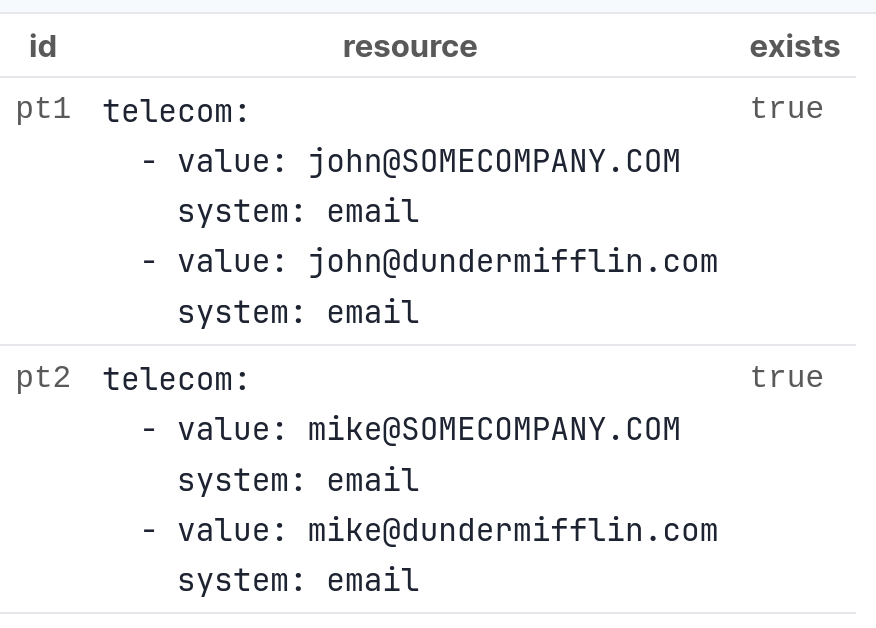
In DB Console, we get results:
Then we can rewrite it like this:
```sql
SELECT *
FROM patient p
WHERE
EXISTS (
SELECT 1 FROM jsonb_array_elements(p.resource -> 'telecom') AS email
WHERE email ->> 'system' = 'email'
AND split_part(lower(email ->> 'value'), '@', 2) = lower('somecompany.com'))
```
And create Search resource using `Search.where` expression (note how we use `{{table}}` and `{{param}}` placeholders):
```
PUT /Search/Patient.email-domain
content-type: text/yaml
accept: text/yaml
resourceType: Search
id: Patient.email-domain
name: email-domain
resource:
id: Patient
resourceType: Entity
where: EXISTS ( SELECT 1 FROM jsonb_array_elements({{table}}.resource -> 'telecom') AS email WHERE email ->> 'system' = 'email' AND split_part(lower(email ->> 'value'), '@', 2) = lower({{param}}::text))
```
Then check search:
```
GET /fhir/Patient?email-domain=somecompany.com
```
This returned both patients. See the SQL:
```
GET /fhir/Patient?email-domain=somecompany.com&_explain=1
```
```
query:
- >-
SELECT "patient".* FROM "patient" WHERE (EXISTS ( SELECT 1 FROM
jsonb_array_elements("patient".resource -> 'telecom') AS email WHERE email
->> 'system' = 'email' AND split_part(lower(email ->> 'value'), '@', 2) =
lower(?::text))) LIMIT ? OFFSET ?
- somecompany.com
- 100
- 0
```
## That's it
We've created a Search resource that solves the problem that FHIR Search cannot solve.
The good thing about Search resource is that it can be used just like SearchParameter (except, we cannot use modifiers) and can be combined with actual SearchParameters, e.g. `GET /fhir/Patient?email-domain=somecompany.com&name=john`. The downside is that, using Search resource, we only change `WHERE` and `ORDER BY` expressions, not the whole SQL. Sometimes it is inconvenient, and you should use [AidboxQuery](../../../api/rest-api/aidbox-search.md#aidboxquery) instead.
See more:
{% content-ref url="../../../api/rest-api/aidbox-search.md" %}
[aidbox-search.md](../../../api/rest-api/aidbox-search.md)
{% endcontent-ref %}
## Other examples
### Encounter.subject performance optimization
```
PUT /Search/Encounter.subject
content-type: text/yaml
accept: text/yaml
resourceType: Search
id: Encounter.subject
name: subject
resource:
id: Encounter
resourceType: Entity
where: "resource #>> '{ subject, id }' = ANY ({{param}}::text[])"
multi: array
```
### Patient.deceased
```
PUT /Search/Patient.deceased
content-type: text/yaml
accept: text/yaml
resourceType: Search
id: Patient.deceased
name: deceased
resource:
id: Patient
resourceType: Entity
where: "coalesce((resource#>>'{deceased,boolean}')::boolean, resource ?? 'deceased', false) = {{param}}"
```
### User.identifier
```
PUT /Search/User.identifier
content-type: text/yaml
accept: text/yaml
resourceType: Search
id: User.identifier
name: identifier
param-parser: token
token-sql:
only-code: 'knife_extract_text({{table}}.resource, ''[["identifier","value"]]'') && ARRAY[{{param.code}}]'
only-system: 'knife_extract_text({{table}}.resource, ''[["identifier", "system"]]'') && ARRAY[{{param.system}}]'
no-system: 'knife_extract_text({{table}}.resource, ''[["identifier","value"]]'') && ARRAY[{{param.code}}]'
both: '(knife_extract_text({{table}}.resource, ''[["identifier","value"]]'') && ARRAY[{{param.code}}]) AND ({{table}}.resource->''identifier'' @> jsonb_build_array(jsonb_build_object(''system'', {{param.system}}::text, ''value'', {{param.code}}::text)))'
text: 'array_to_string(knife_extract({{table}}.resource, ''[["identifier"]]''), '''') ilike {{param.text}}'
text-format: '%?%'
where: '(knife_extract_text({{table}}.resource, ''[["identifier","value"]]'') && ARRAY[{{param.code}}]) AND ({{table}}.resource->''identifier'' @> jsonb_build_array(jsonb_build_object(''system'', {{param.system}}::text, ''value'', {{param.code}}::text)))'
resource: {id: User, resourceType: Entity}
```
### ServiceRequest.subject performance optimization
```
PUT /Search/ServiceRequest.subject
content-type: text/yaml
accept: text/yaml
resourceType: Search
name: subject
resource: {id: ServiceRequest, resourceType: Entity}
where: "{{table}}.resource#>> '{ subject, id }' = {{param.id}}"
param-parser: reference
```
### Search and sort by field in the related resource
```
PUT /Search/Patient.organization-name
content-type: text/yaml
accept: text/yaml
resourceType: Search
name: organization-name
resource: {id: Patient, resourceType: Entity}
where: "(select org.resource ->> 'name' from organization org where {{table}}.resource #>> '{ managingOrganization, id }' = org.id) = {{param}}::text"
order-by: "(select org.resource ->> 'name' from organization org where {{table}}.resource #>> '{ managingOrganization, id }' = org.id)"
```