---
description: This guide explains how to get Growth Chart SMART App launched
---
# Get a SMART App Launched
[Growth Chart](https://github.com/smart-on-fhir/growth-chart-app) is a sample SMART App which displays children growth data as plot.
## Set Up Aidbox Project
First you need to specify your new SMART API using the [Aidbox API Constructor](../../../zen-related/api-constructor-docs-beta.md).
Create the `aidbox-project/single-patient-portal.edn` file with the following content:
```clojure
{ns single-patient-portal
import #{zenbox
aidbox.auth}
root-api
{:zen/tags #{zenbox/api}
"smart" {:apis #{smart-api}}}
grant-lookup-method
{:zen/tags #{aidbox.auth/grant-lookup}
:method aidbox.auth/single-patient-grant-lookup}
smart-api
{:zen/tags #{zenbox/api}
:middlewares [:smart.fhir/single-patient-auth-middleware]
".well-known" {"smart-configuration" {:GET {:action :smart.fhir/smart-configuration
:public true}}}
"metadata" {:GET {:action :smart.fhir/capability
:public true}}
"style-v1.json" {:GET {:action :smart.fhir/style
:public true}}
"Patient" {[:id] {:GET {:action :smart.fhir/read
:resource/type "Patient"}}}
"Observation" {:GET {:action :smart.fhir/search
:resource/type "Observation"
:params {:_count {}
:code {}
:patient {}}}}}}
```
## Set Up Growth Chart
You need to create Standalone Patient Launch page for the Growth Chart. Create the `growth-chart/standalone/patient.html` file with the following content (which is just modified example from the Growth Chart repository):
```html
Growth Chart SMART Application
Loading...
```
## Set Up Docker Compose
Create the Compose file which starts Aidbox, Growth Chart, and mounts volumes with their configuration.
`docker-compose.yml`:
```yaml
services:
aidboxdb:
image: "healthsamurai/aidboxdb:13.2"
pull_policy: always
restart: on-failure:5
volumes:
- "./pgdata:/data"
environment:
POSTGRES_USER: "${PGUSER}"
POSTGRES_PASSWORD: "${PGPASSWORD}"
POSTGRES_DB: "${PGDATABASE}"
aidbox:
image: "healthsamurai/aidboxone:edge"
pull_policy: always
depends_on: ["aidboxdb"]
restart: on-failure
ports:
- "8888:8888"
env_file:
- .env
environment:
PGHOST: "aidboxdb"
PGPORT: "5432"
AIDBOX_PORT: "8888"
AIDBOX_FHIR_VERSION: "4.0.1"
AIDBOX_ZEN_PROJECT: "/aidbox-project"
AIDBOX_ZEN_ENTRY: "single-patient-portal"
AIDBOX_DEV_MODE: 1
AIDBOX_ZEN_DEV_MODE: "ok"
AIDBOX_COMPLIANCE: "enabled"
volumes:
- "./aidbox-project:/aidbox-project"
growth-chart:
image: thezorkij/growth-chart-app:latest
ports:
- "9000:9000"
volumes:
- "./growth-chart/standalone:/app/standalone"
```
Create the `.env` file and fill in your Aidbox License ID and License Key:
```bash
AIDBOX_LICENSE_ID=
AIDBOX_LICENSE_KEY=
AIDBOX_BASE_URL=http://localhost:8888
# Client to create on start up
AIDBOX_CLIENT_ID=root
AIDBOX_CLIENT_SECRET=secret
# root user to create on start up
AIDBOX_ADMIN_ID=admin
AIDBOX_ADMIN_PASSWORD=secret
# db connection params
PGPORT=5432
PGUSER=postgres
PGPASSWORD=postgres
PGDATABASE=aidbox
```
## Start Containers
run the `docker-compose up` command.
## Configure Aidbox
You need to create `Client`, `User`, `Patient`, `AccessPolicy`, and load `Observations`.
### Sign In
Go to `http://localhost:8888` and login as `admin` then use Notebooks to run the following queries.
### Create Client
```yaml
PUT /Client/growth-chart
auth:
authorization_code:
audience:
- http://localhost:8888/smart
redirect_uri: http://localhost:9000/
smart:
launch_uri: http://localhost:9000/launch.html
secret: gc
grant_types:
- authorization_code
```
### Create Patient
```yaml
PUT /Patient/patient-1
idyaml: patient-1
name:
- given:
- Marcus
family: Berg
use: usual
birthDate: '2000-12-27'
active: true
gender: male
```
### Create User
The user needs to be linked with a Patient resource
```yaml
PUT /User/user
email: user@test.com
fhirUser:
id: patient-1
resourceType: Patient
password: '123456'
```
### Create Role
```yaml
POST /Role
name: Patient
user:
id: user
resourceType: User
links:
patient:
id: patient-1
resourceType: Patient
```
### Create Access policies
#### Allow Growth Chart to Access Patient Data
```yaml
PUT /AccessPolicy/smart-read-patient-on-behalf
engine: matcho
matcho:
uri: '#/smart/Patient/.*'
params:
id: .on-behalf.fhirUser.id
```
#### Allow Growth Chart to Access Patient Observations
```yaml
PUT /AccessPolicy/smart-search-on-behalf
engine: matcho
matcho:
uri: '#/smart/Observation'
params:
patient: .on-behalf.fhirUser.id
```
### Load Observations and Encounters
```yaml
POST /
type: transaction
entry:
- resource:
id: enc-1
status: finished
class:
system: http://terminology.hl7.org/CodeSystem/v3-ActCode
code: AMB
display: ambulatory
period:
start: '2003-11-28'
end: '2003-11-28'
subject:
resourceType: Patient
id: patient-1
fullUrl: 'Encounter/enc-1'
request:
method: POST
url: "/Encounter"
- resource:
id: height-1
encounter:
uri: 'Encounter/enc-1'
value:
Quantity:
system: http://unitsofmeasure.org
unit: cm
value: 115.316
code: cm
status: final
effective:
dateTime: '2003-11-28'
code:
coding:
- system: http://loinc.org
code: 8302-2
display: height
text: height
subject:
resourceType: Patient
id: patient-1
fullUrl: 'Observation/height-1'
request:
method: POST
url: "/Observation"
- resource:
id: weight-1
encounter:
uri: 'Encounter/enc-1'
value:
Quantity:
system: http://unitsofmeasure.org
unit: kg
value: 18.55193
code: kg
resourceType: Observation
status: final
effective:
dateTime: '2003-11-28'
code:
coding:
- system: http://loinc.org
code: 3141-9
display: weight
text: weight
subject:
resourceType: Patient
id: patient-1
fullUrl: 'Observation/weight-1'
request:
method: POST
url: "/Observation"
- resource:
id: bmi-1
encounter:
uri: 'Encounter/enc-1'
value:
Quantity:
system: http://unitsofmeasure.org
unit: kg/m2
value: 13.9
code: kg/m2
resourceType: Observation
status: final
effective:
dateTime: '2003-11-28'
code:
coding:
- system: http://loinc.org
code: 39156-5
display: bmi
text: bmi
subject:
resourceType: Patient
id: patient-1
fullUrl: 'Observation/bmi-1'
request:
method: POST
url: "/Observation"
- resource:
status: finished
id: enc-2
class:
system: http://terminology.hl7.org/CodeSystem/v3-ActCode
code: AMB
display: ambulatory
period:
start: '2004-11-28'
end: '2004-11-28'
subject:
resourceType: Patient
id: patient-1
fullUrl: 'Encounter/enc-2'
request:
method: POST
url: "/Encounter"
- resource:
encounter:
uri: 'Encounter/enc-2'
value:
Quantity:
system: http://unitsofmeasure.org
unit: cm
value: 125.316
code: cm
resourceType: Observation
status: final
effective:
dateTime: '2004-11-28'
id: height-2
code:
coding:
- system: http://loinc.org
code: 8302-2
display: height
text: height
subject:
resourceType: Patient
id: patient-1
fullUrl: 'Observation/height-2'
request:
method: POST
url: "/Observation"
- resource:
encounter:
uri: 'Encounter/enc-2'
value:
Quantity:
system: http://unitsofmeasure.org
unit: kg
value: 22.55193
code: kg
resourceType: Observation
status: final
effective:
dateTime: '2004-11-28'
id: weight-2
code:
coding:
- system: http://loinc.org
code: 3141-9
display: weight
text: weight
subject:
resourceType: Patient
id: patient-1
fullUrl: 'Observation/weight-2'
request:
method: POST
url: "/Observation"
- resource:
encounter:
uri: 'Encounter/enc-2'
value:
Quantity:
system: http://unitsofmeasure.org
unit: kg/m2
value: 17.6
code: kg/m2
resourceType: Observation
status: final
effective:
dateTime: '2004-11-28'
id: bmi-2
code:
coding:
- system: http://loinc.org
code: 39156-5
display: bmi
text: bmi
subject:
resourceType: Patient
id: patient-1
fullUrl: 'Observation/bmi-2'
request:
method: POST
url: "/Observation"
```
## Launch Growth Chart
### Log out
Log out from Aidbox.
### Launch App
Open `http://localhost:9000/standalone/patient.html` it will redirect you to login page. Sign in as `user` and allow access to the data for the Growth Chart App.
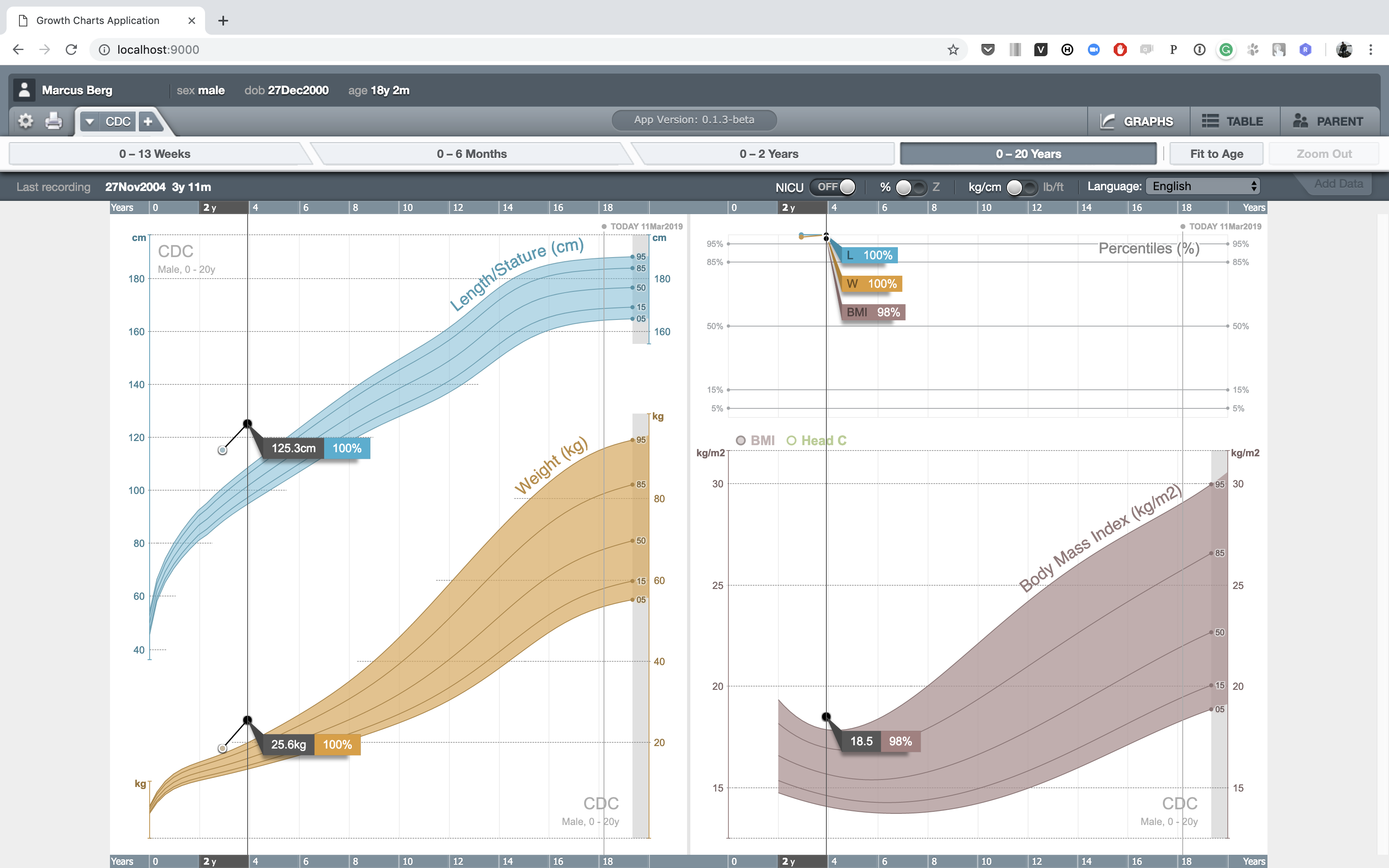
Now you should be able to see a plot of Observations