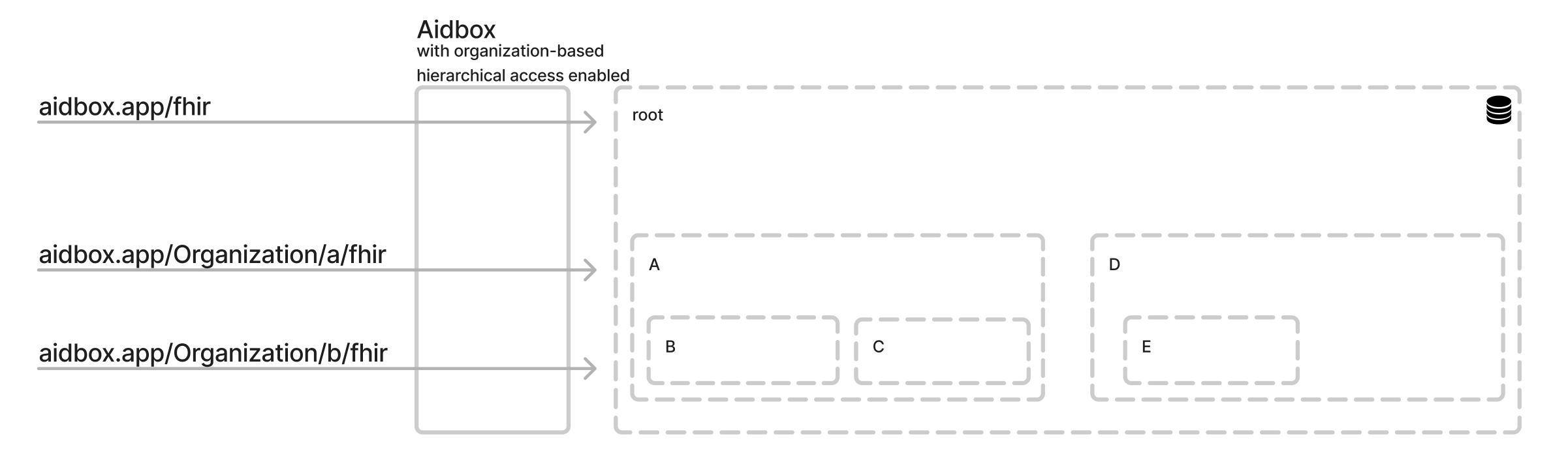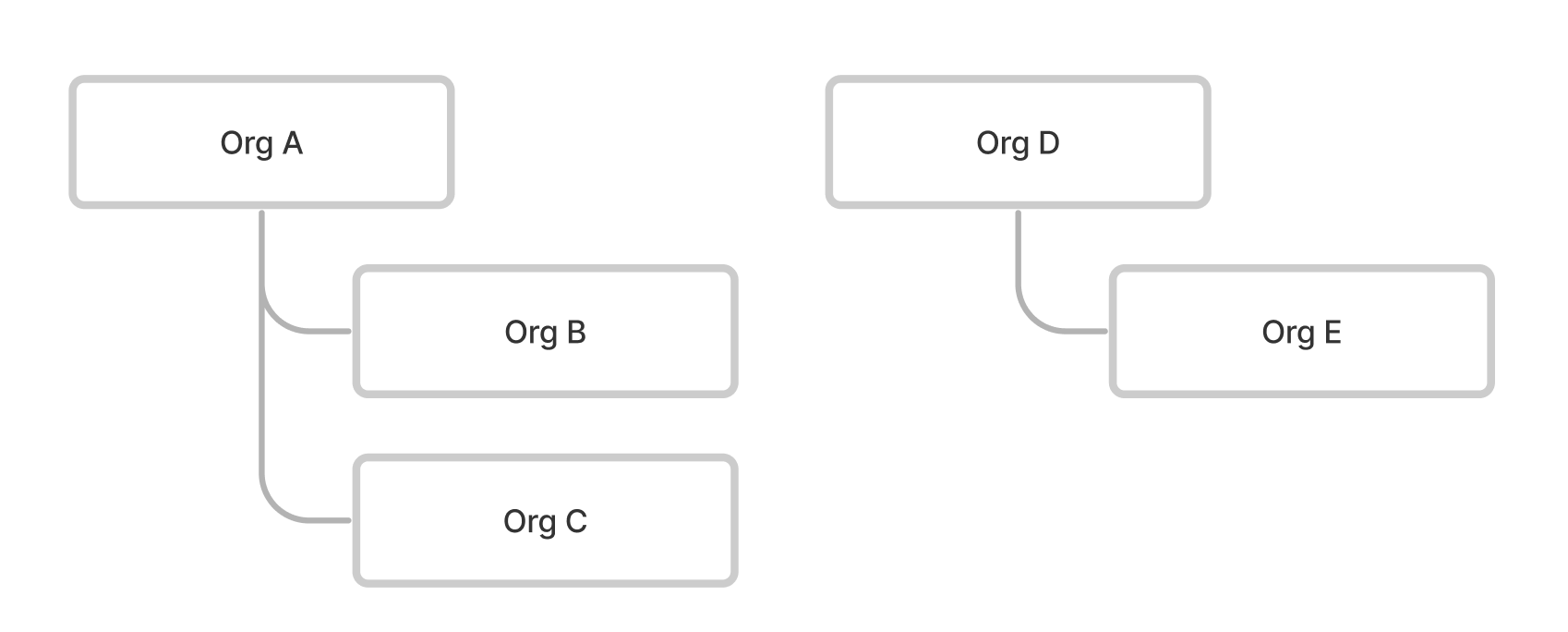
```
### Bundle
Supported `transaction` and `batch` bundle types.
```yaml
POST /Organization/org-a/fhir/
Accept: text/yaml
Content-Type: text/yaml
resourceType: Bundle
# transaction | batch
type: transaction
entry:
- request:
method: POST
url: 'Patient'
resource:
birthDate: '2021-01-01'
id: 'pt-1'
meta:
organization:
id: 'org-c'
resourceType: 'Organization'
- request:
method: POST
url: 'Patient'
resource:
birthDate: '2021-01-01'
id: 'pt-2'
- request:
method: PATCH
url: 'Patient/pt-3?_method=json-patch'
resource:
- op: replace
path: birthDate
value: '2021-01-01'
```
It is also possible to use org-based url in a `request.url`:
POST /
Accept: text/yaml
Content-Type: text/yaml
resourceType: Bundle
# transaction | batch
type: transaction
entry:
- request:
method: GET
url: '/Organization/org-a/fhir/Patient/pt-1'
- request:
method: PUT
url: '/Organization/org-b/fhir/Patient/pt-3'
resource:
birthDate: '2021-01-01'
- request:
method: POST
url: '/Organization/org-a/fhir/Patient'
resource:
birthDate: '2021-01-01'
id: 'pt-4'
See also [Transactions page](../../../api/batch-transaction.md)
#### Conditional Create with Bundle
{% hint style="warning" %}
Conditional operations are available starting from version 2509.
{% endhint %}
```
POST /Organization/org-a/fhir/
Content-Type: application/fhir+json
{
"resourceType": "Bundle",
"type": "batch",
"entry": [
{
"request": {
"method": "POST",
"url": "Observation",
"ifNoneExist": "identifier=http://acme.org/obs|12345"
},
"resource": {
"resourceType": "Observation",
"status": "final",
"identifier": [{ "system": "http://acme.org/obs", "value": "12345" }],
"code": { "text": "Example observation" }
}
}
]
}
```
#### Conditional Update with Bundle
{% hint style="warning" %}
Conditional operations are available starting from version 2509.
{% endhint %}
```
POST /Organization/org-a/fhir/
Content-Type: application/fhir+json
{
"resourceType": "Bundle",
"type": "batch",
"entry": [
{
"request": {
"method": "PUT",
"url": "Observation?identifier=http://acme.org/obs|12345"
},
"resource": {
"resourceType": "Observation",
"status": "final",
"identifier": [{ "system": "http://acme.org/obs", "value": "12345" }],
"code": { "text": "Example observation" }
}
}
]
}
```
#### Conditional Delete with Bundle
{% hint style="warning" %}
Conditional operations are available starting from version 2509.
{% endhint %}
```
POST /Organization/org-a/fhir/
Content-Type: application/fhir+json
{
"resourceType": "Bundle",
"type": "batch",
"entry": [
{
"request": {
"method": "DELETE",
"url": "Observation?identifier=http://acme.org/obs|12345"
}
}
]
}
```
### Metadata
```
GET /Organization//fhir/metadata
```
### AidboxQuery
{% hint style="info" %}
[Learn more about AidboxQuery](../../../api/rest-api/aidbox-search.md#aidboxquery).
{% endhint %}
To use `$query` endpoint under organization-based hierarchical access control, it is necessary to create explicitly `organization` param in `AidboxQuery`.
```yaml
PUT /AidboxQuery/
params:
organization:
type: string
query: "SELECT * from patient pt WHERE pt.resource#>>'{meta,organization,id}' = {{params.organization}}"
count-query: "SELECT count(*) from patient pt WHERE pt.resource#>>'{meta,organization,id}' = {{params.organization}}"
type: query
```
Now `org-id` is automatically available in the query in `{{params.organization}}`.
```yaml
GET /Organization//$query/
```
### GraphQL
```
POST /Organization//aidbox/$graphql
```
Since version 2503 GraphQL is supported in OrgBAC mode. Note that it can be accessed only on the non-FHIR endpoint, because our GraphQL implementation is slightly different from FHIR.
See also: [graphql-api.md](../../../api/graphql-api.md)
### Group-level Export
#### Start Export
```
GET /Organization//fhir/Group//$export
```
Starts a group-level export for the specified organization and group.
#### Check Export Status
```
GET /Organization//fhir/$export-status/
```
Checks the status of an export job for the specified organization.
#### Cancel Export
```
DELETE /Organization//fhir/$export-status/
```
Cancels an active export job for the specified organization.
See also [$export](../../../api/bulk-api/export.md#group-level-export)
## Authentication
### Login View
```
GET /Organization//auth/login
```
Returns the login view for the specified organization.
### Login
```
POST /Organization//auth/login
```
Performs loginfor the specified organization.
## Shared resource mode
By default, nested API has no access to a resource that belongs to the upper organizations. Sometimes it is necessary to have resources that can be accessed by the nested APIs. To achieve it the resource should be marked as `shared`.
{% hint style="warning" %}
Update and delete operations are not allowed from nested organizations' APIs. To update or delete `shared`resource use its root organization API.
{% endhint %}
### Create a shared resource
To create a shared resource, use the `https://aidbox.app/tenant-resource-mode` extension.
```
PUT /Organization/org-a/fhir/Practitioner/prac-1
content-type: text/yaml
meta:
extension:
- url: https://aidbox.app/tenant-resource-mode
valueString: "shared"
```
### Access shared resource from a nested API
Now, if `org-b` is a child organization of `org-a`, (**Organization.partOf** references `org-a`), we get the access to the shared resource:
```
GET /Organization/org-b/fhir/Practitioner/prac-1
```
## See also
{% content-ref url="../../../tutorials/security-access-control-tutorials/how-to-enable-hierarchical-access-control.md" %}
[how-to-enable-hierarchical-access-control.md](../../../tutorials/security-access-control-tutorials/how-to-enable-hierarchical-access-control.md)
{% endcontent-ref %}